

Summary
“02 Road Map / World Map” is an official guide from MapleStory M Official News on 2023-02-06. Its canonical Nexon thread and publication metadata are retained for source-backed verification.
Article body
|
Road Map |
- Check information about the area your character is currently in.
- Road Map includes the functions [Auto-Navigate] and [Teleport].
> [Auto-Navigate]: Automatically move to the location you want by selecting the desired area.
> [Teleport]: Teleport freely anywhere in the World Map Warp Drive. For areas not on the World Map Warp Drive, use the Teleport Rock to teleport to them.
|
World Map |
- Check information about the town that your character is currently in.
- When you select a town on the World Map, you'll be transferred to that town's Road Map and will have the ability to check information on the selected town.
|
How to Change Channels |
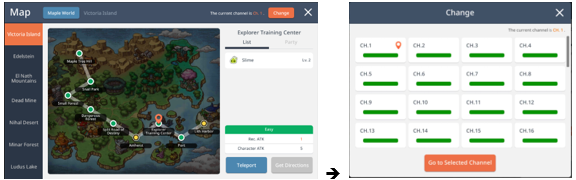
- On the upper right portion of the Road/World Map, you can check the channel you're currently on and use [Change Channel] to move to the desired channel.
Step 01. Select [Current Location].

Step 02. Tap [Change Channel] to move to the desired channel.
More from this series
This Guides entry belongs to MapleStory M. Related pages below keep this series separate from other MapleStory games.
Source and verification
MPStorys shows the readable on-site body above. The source page remains attached only as a citation and update trail.
MapleStory M Official News