

Summary
“05 Mailbox” is an official guide from MapleStory M Official News on 2023-02-06. Its canonical Nexon thread and publication metadata are retained for source-backed verification.
Article body
|
Mailbox Guide |
- Your mailbox displays the time remaining before the mail disappears, as well as the items and the number of items that can be claimed.
- Tap [Get All] to collect all the items at once.
|
Shared Mailbox / Personal Mailbox / Notice Mailbox
|
- The three types of mailboxes are [Default], [Personal], and [Notice]
- You can choose how you want to sort your mailbox.
- Select mail lets you choose to receive only the mail you want.
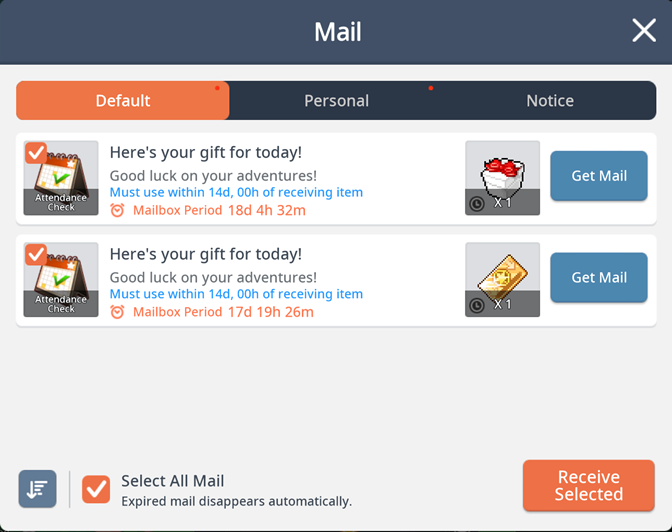
01. Shared Mailbox
- Check the shared mailbox for mail such as attendance rewards and event rewards sent to your account.
- All characters created on the current account can use the rewards delivered to the shared mailbox.
- If one character has claimed a reward, other characters cannot claim it nor can it be transferred.
02. Personal Mailbox
- Check the personal mailbox for mail delivered to specific characters.
03. Notice Mailbox
- Check the notice mailbox for mail such as reports and notice mail sent to your account.
04. Diversify how you sort your mail
- You can sort and view your mail in two ways: Time Gained and Mailbox Period.
05. Mail selection function
- You can select the checkbox on the top left of the mail icon to select mail and receive only the mail you want.
|
Mailbox Tip |
- There is no limit to the amount of mail you can store in the mailbox.
- Expired mail automatically disappears and cannot be restored, so make sure you claim your mail before it expires!
More from this series
This Guides entry belongs to MapleStory M. Related pages below keep this series separate from other MapleStory games.
Source and verification
MPStorys shows the readable on-site body above. The source page remains attached only as a citation and update trail.
MapleStory M Official News