

摘要
“05 Mailbox” is an official guide from MapleStory M Official News on 2023-02-06. Its canonical Nexon thread and publication metadata are retained for source-backed verification.
正文
|
Mailbox Guide |
- Your mailbox displays the time remaining before the mail disappears, as well as the items and the number of items that can be claimed.
- Tap [Get All] to collect all the items at once.
|
Shared Mailbox / Personal Mailbox / Notice Mailbox
|
- The three types of mailboxes are [Default], [Personal], and [Notice]
- You can choose how you want to sort your mailbox.
- Select mail lets you choose to receive only the mail you want.
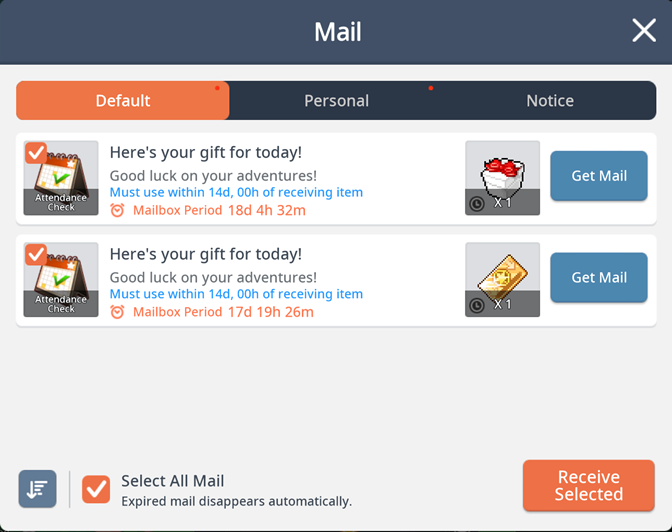
01. Shared Mailbox
- Check the shared mailbox for mail such as attendance rewards and event rewards sent to your account.
- All characters created on the current account can use the rewards delivered to the shared mailbox.
- If one character has claimed a reward, other characters cannot claim it nor can it be transferred.
02. Personal Mailbox
- Check the personal mailbox for mail delivered to specific characters.
03. Notice Mailbox
- Check the notice mailbox for mail such as reports and notice mail sent to your account.
04. Diversify how you sort your mail
- You can sort and view your mail in two ways: Time Gained and Mailbox Period.
05. Mail selection function
- You can select the checkbox on the top left of the mail icon to select mail and receive only the mail you want.
|
Mailbox Tip |
- There is no limit to the amount of mail you can store in the mailbox.
- Expired mail automatically disappears and cannot be restored, so make sure you claim your mail before it expires!
此系列的更多內容
這筆攻略內容僅屬於 MapleStory M。下方相關頁面也按此系列獨立整理,不會與其他 MapleStory 作品混用。
來源與核驗
上方已在本站顯示可閱讀正文;來源頁面只作為引用與後續更新核驗。
MapleStory M Official News