 MapleStory MGLB
08 Quest Auto-Proceed System

Summary
“08 Quest Auto-Proceed System” is an official guide from MapleStory M Official News on 2023-02-06. Its canonical Nexon thread and publication metadata are retained for source-backed verification.
Article body
|
Quest Auto-Proceed System Guide |
- The Quest Auto-Proceed system automatically fights battles until the selected quest reaches its goal.
- When the goal is reached, you will automatically be moved to the NPC who will give you a reward.
- Auto-Battle uses the Auto-Battle time, but the Quest Auto-Proceed system does not.
|
How to Use the Quest Auto-Proceed System |
▶ How to Use Auto-Play for Quests
- From the [To-Do*] tab or the [Quest] menu, select the quest you want to progress.
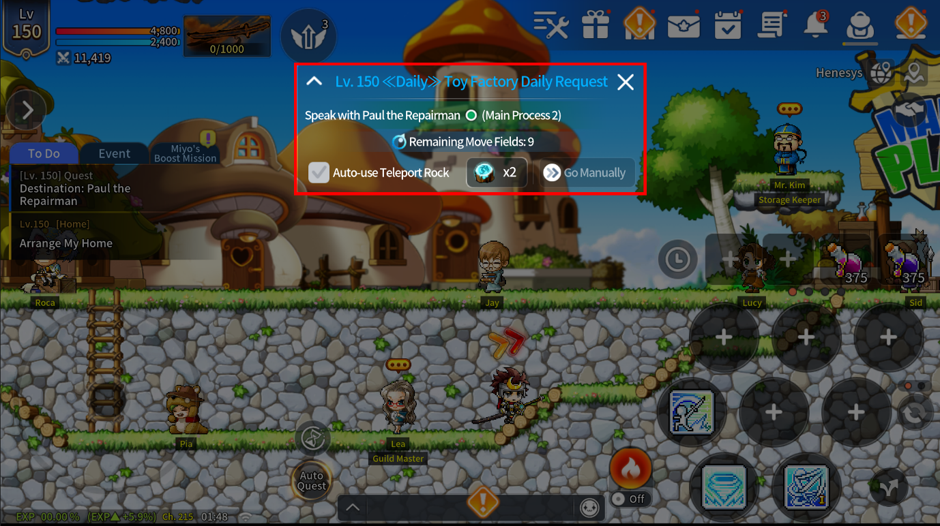
- Tapping a quest in the [To-Do*] tab, or selecting the [Progress] button in the Quest menu, will bring up the [Quest Auto-Play Popup] and automatically move you to the NPC where you can start the quest.
- Once you reach the NPC, a quest dialogue window will appear.
- Selecting [Confirm] in the dialogue window to accept the quest will automatically move you to the map for the quest objective and automatically battle until the objective is complete.
- Once you complete the quest objective, you will automatically move to the NPC where the quest is completed, and a dialogue window for completing the quest will open.
- If you don't want to use Auto-Play for quests, you can accept the quest, then tap the active [Auto-Play] button in the quest notification window at the center of the screen to progress the quest manually.
More from this series
This Guides entry belongs to MapleStory M. Related pages below keep this series separate from other MapleStory games.
Source and verification
MPStorys shows the readable on-site body above. The source page remains attached only as a citation and update trail.
MapleStory M Official News