

摘要
“08 Quest Auto-Proceed System” is an official guide from MapleStory M Official News on 2023-02-06. Its canonical Nexon thread and publication metadata are retained for source-backed verification.
正文
|
Quest Auto-Proceed System Guide |
- The Quest Auto-Proceed system automatically fights battles until the selected quest reaches its goal.
- When the goal is reached, you will automatically be moved to the NPC who will give you a reward.
- Auto-Battle uses the Auto-Battle time, but the Quest Auto-Proceed system does not.
|
How to Use the Quest Auto-Proceed System |
▶ How to Use Auto-Play for Quests
- From the [To-Do*] tab or the [Quest] menu, select the quest you want to progress.
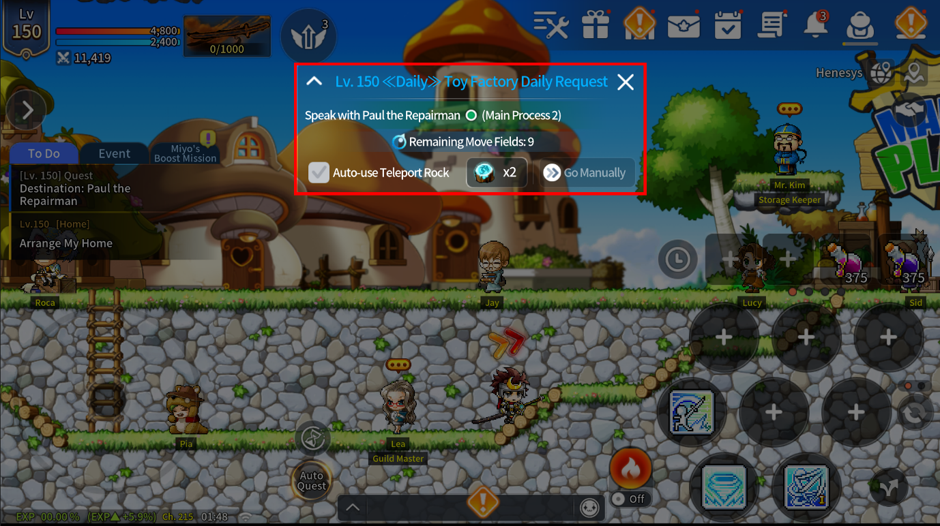
- Tapping a quest in the [To-Do*] tab, or selecting the [Progress] button in the Quest menu, will bring up the [Quest Auto-Play Popup] and automatically move you to the NPC where you can start the quest.
- Once you reach the NPC, a quest dialogue window will appear.
- Selecting [Confirm] in the dialogue window to accept the quest will automatically move you to the map for the quest objective and automatically battle until the objective is complete.
- Once you complete the quest objective, you will automatically move to the NPC where the quest is completed, and a dialogue window for completing the quest will open.
- If you don't want to use Auto-Play for quests, you can accept the quest, then tap the active [Auto-Play] button in the quest notification window at the center of the screen to progress the quest manually.
此系列的更多內容
這筆攻略內容僅屬於 MapleStory M。下方相關頁面也按此系列獨立整理,不會與其他 MapleStory 作品混用。
來源與核驗
上方已在本站顯示可閱讀正文;來源頁面只作為引用與後續更新核驗。
MapleStory M Official News