

Summary
“09 Legion System” is an official guide from MapleStory M Official News on 2023-02-06. Its canonical Nexon thread and publication metadata are retained for source-backed verification.
Article body
|
Legion |
01. What is a Legion?
- Using your account characters in your current world, you can receive a Conquest Effect by assigning members of a Legion. Raise your Legion level and increase your Cumulative Level Effect to grow even stronger.
- Legion members will increase in rank depending on their character level. Legion content becomes available once you have a character that is Lv. 60 or above in the current world.
- The sum level of your Lv. 60+ account characters in your current world will be displayed as the Cumulative Level.
02. Viewing the Legion System
- You can view the Legion rank, Synergy Grid, and Legion Raid via [Character] > [Legion System].

03. The Cumulative Level Effect
- The Cumulative Level Effect is applied to all characters of your current world, even if you do not increase their Legion rank via level ups.
- The Cumulative Level Effect (stats below) is cumulatively applied
- Please refer to the table below for the different option effects per Legion cumulative level.
| Legion Cumulative Level | Options Applied |
| 100 | EXP Increase 3% |
| 400 | Crit Rate 3% Crit DMG 3% |
| 700 | PHY DEF Increase 4% MAG DEF Increase 4% |
| 1,000 | Boss ATK Increase +3% Boss DEF Increase +3% |
| 1,600 | PHY ATK Increase 4% MAG ATK Increase 4% |
| 1,900 | Max DMG 500,000 |
| 2,100 | PHY DMG Reduction 3% MAG DMG Reduction 3% |
| 2,400 | Max DMG 500,000 |
| 3,000 | Max DMG 500,000 |
| 3,300 | Crit Rate 3% |
| 3,600 | Max DMG 500,000 |
| 3,900 | Crit DMG 3% |
| 4,200 | Max DMG 750,000 |
| 4,500 | PHY DMG Increase 4% MAG DMG Increase 4% |
| 5,000 | Max DMG 750,000 |
| 6,000 | Max DMG 750,000 |
| 6,700 | PHY DMG Increase 4% MAG DMG Increase 4% |
| 7,500 | Max DMG 1,000,000 |
| 8,500 | Max DMG 1,000,000 |
| 9,500 | PHY ATK Increase 4% MAG ATK Increase 4% |
| 10,000 | Max DMG 1,000,000 |
| 11,000 | Max DMG 1,000,000 |
| 12,000 | Max DMG 1,000,000 |
| 12,500 | Max DMG 1,000,000 |
|
The Legion Synergy Grid |
01. Legion Assignment
- You can assign characters that meet the Legion member requirements via [Character] > [Legion] > [Assignment].
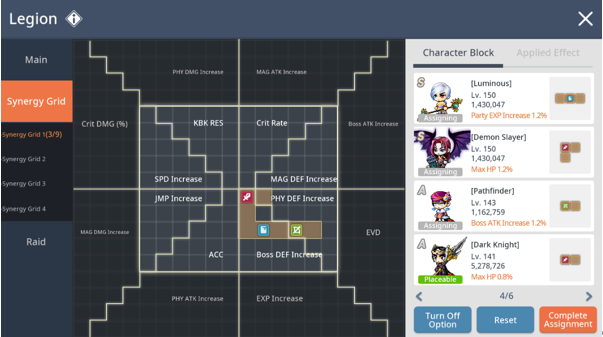

- Tap [Assign Synergy Grid] to make adjustments to the Synergy Grid.
- Tap the directional keys or select a block to assign characters to an area of your choice. Each area will grant a specific stat.
- You must occupy one of the four center blocks to assign additional characters.
02. Conquest Effect
- Depending on where characters are placed on the Synergy Grid, different Conquest Effects will be applied to your world characters.
- You can change the location of stats 1 through 8 in the list below.
- Selecting the stat while in Assignment mode will allow you to change the stat location. Selecting a stat that is already on the Synergy Grid will swap locations.
| Type | No. | Conquest Effect Type | Stats per Block |
| Location can be changed | 1 | Power Stance | 1 |
| 2 | SPD Increase | 0.6% | |
| 3 | JMP Increase | 0.4% | |
| 4 | ACC | 0.6% | |
| 5 | Boss DEF Increase | 0.5% | |
| 6 | PHY DEF Increase | 0.5% | |
| 7 | MAG DEF Increase | 0.5% | |
| 8 | Crit Rate | 0.4% | |
| Fixed Location | 9 | PHY DMG Increase | 0.5% |
| 10 | Crit DMG | 0.4% | |
| 11 | MAG DMG Increase | 0.5% | |
| 12 | PHY ATK Increase | 0.5% | |
| 13 | EXP Increase | 0.6% | |
| 14 | EVD | 0.6% | |
| 15 | Boss ATK Increase | 0.5% | |
| 16 | MAG ATK Increase | 0.5% |
03. Assignment Rank and Character Level
- Your character's assignment rank depends on its level. Once your character reaches Lv. 60, it will be assigned as Rank B (Lv. 60 or higher).
| Rank | Character Level |
| B | 60 |
| A | 100 |
| S | 150 |
| SS | 200 |
| SSS | 250 |
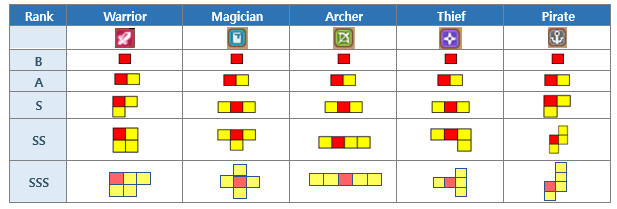
04. Block Shapes by Rank and Job
- The shape of Synergy Grid blocks changes according to your character's rank and job, and blocks may be rotated or inverted if you choose.
05. Raider Effect
- You can acquire effects when assigning character blocks on Synergy Grid.
- These effects are not affected by the area where the blocks are located, but are determined by the blocks’ class.
- The stats will increase with increasing Raiders’ rank.
| Rank | Warrior | Magician | Archer | Thief | Pirate |
| Effect Type | Max HP | Party EXP Increase | Boss ATK Increase | Crit DMG | EXP Increase |
| Rank B | 0.4% | 0.40% | 0.60% | 0.60% | 0.80% |
| Rank A | 0.8% | 0.80% | 1.20% | 1.20% | 1.60% |
| Rank S | 1.2% | 1.20% | 1.80% | 1.80% | 2.40% |
| Rank SS | 1.6% | 1.60% | 2.40% | 2.40% | 3.20% |
| Rank SSS | 2.0% | 2.00% | 3.00% | 3.00% | 4.00% |
| Max Limit | 10.00% | 10.00% | 15.00% | 15.00% | 20.00% |
|
Maple PC Account Link and Legion |
- You can assign your highest level PC MapleStory character to MapleStory M’s Legion Synergy Grid.
- The PC MapleStory character Legion Block can be placed without being limited by the number of characters placed on the MapleStory M Legion Synergy Grid.
- The rank of the Legion Block will increase based on the level of your highest level PC MapleStory character. The rank will be the same level as that of MapleStory M.
> B: Lv. 60
> A: Lv. 100
> S: Lv. 150
> SS: Lv. 200
- Legion Synergy Grid effect will be applied and other stats can be acquired.
- Your PC MapleStory character's blocks will be the same shape as a 'Warrior'.
- You cannot achieve a SSS rank from your PC block even when the PC character is above Lv.250. (SS is the maximum.)
- Zero characters and any characters in an Event World including Burning World from PC cannot be linked or assigned in MapleStory M Legion.
- PC characters’ legion block does not grant a Raider Effect.
|
Legion Raid |

01. Legion Raid Guide
- The Legion Raid proceeds with the currently assigned Legion members. The Raid automatically begins once a character is registered as a Legion member. Please note that only the 6 highest level characters in the Raid will be displayed.
- You can check the total Coins acquired and damage dealt in the Raid via [Character] > [Legion] > [Raid].
- The higher your character's Combat Power, the more damage they deal. Your character's Combat Power depends on their level and Star Force.
02. Coin Acquisition Guide
- You will automatically collect Legion Coins once you start the Legion Raid.
- You will receive a pop-up notification once you accrue the maximum amount of coins from the Raid. Please enter the Legion Raid to collect your accrued Legion Coins when you receive this notification.
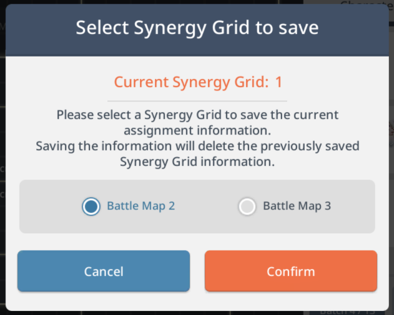
- You will also automatically collect Legion Coins when you change Synergy Grid Presets.

|
Legion Rank |
01. Legion Rank Guide
- Once your Legion reaches a specific level, you can increase its rank.
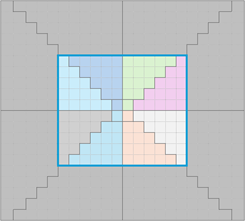
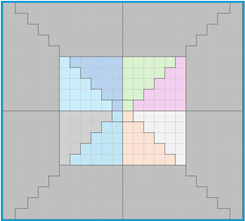
- The higher your Legion rank, the more Legion members you can assign. In addition to the increased max Legion member assignment limit, the Synergy Grid area will also expand.
| Rank | Synergy Grid Area |
| Nameless Legion I (12x10) |
|
| Nameless Legion II (14x12) |
|
| Nameless Legion V (16x14) |
|
| Renowned Legion III (18x16) |
|
| Heroic Legion III (20x18) |
|
| Supreme Legion I (22x20) |
|
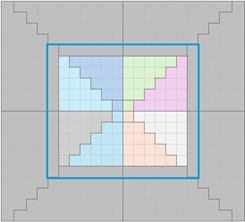
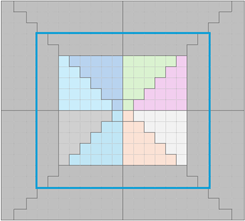
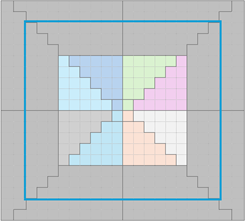
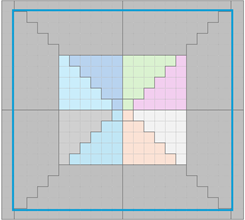
02. Legion Rank Types
| Rank | Cumulative Level | Required Legion Coins | Max. Legion Members | Rank Mark |
| Nameless Legion I | Basic Rank | 12 |
| |
| Nameless Legion II | 1,000 | - | 15 |
|
| Nameless Legion III | 1,500 | 50 | 17 |
|
| Nameless Legion IV | 2,000 | 60 | 19 |
|
| Nameless Legion V | 2,500 | 70 | 21 |
|
| Renowned Legion I | 3,000 | 100 | 23 |
|
| Renowned Legion II | 3,500 | 120 | 25 |
|
| Renowned Legion III | 4,000 | 140 | 28 |
|
| Renowned Legion IV | 4,500 | 160 | 29 |
|
| Renowned Legion V | 5,000 | 180 | 30 |
|
| Heroic Legion I | 5,500 | 300 | 31 |
|
| Heroic Legion II | 6,000 | 400 | 32 |
|
| Heroic Legion III | 6,500 | 500 | 33 |
|
| Heroic Legion IV | 7,000 | 600 | 34 |
|
| Heroic Legion V | 7,500 | 700 | 35 |
|
| Legendary Legion I | 8,000 | 1,200 | 36 |
|
| Legendary Legion II | 8,500 | 1,400 | 37 |
|
| Legendary Legion III | 9,000 | 1,600 | 38 |
|
| Legendary Legion IV | 9,500 | 1,800 | 39 |
|
| Legendary Legion V | 10,000 | 2,000 | 40 |
|
| Supreme Legion I | 10,500 | 3,000 | 41 |
|
| Supreme Legion II | 11,000 | 4,000 | 42 |
|
| Supreme Legion III | 11,500 | 5,000 | 43 |
|
| Supreme Legion IV | 12,000 | 6,000 | 44 |
|
| Supreme Legion V | 12,500 | 7,000 | 45 |
|


|
Legion Notes |
- You cannot delete a character that is assigned to your Legion. Please unassign the character before deletion.
- Deleting a character will cause the Cumulative Level to drop, which can potentially change your Legion Rank.
More from this series
This Guides entry belongs to MapleStory M. Related pages below keep this series separate from other MapleStory games.
Source and verification
MPStorys shows the readable on-site body above. The source page remains attached only as a citation and update trail.
MapleStory M Official News