

Summary
“11 Androids” is an official guide from MapleStory M Official News on 2023-02-06. Its canonical Nexon thread and publication metadata are retained for source-backed verification.
Article body
|
Intro to Androids |
- Androids stick by your side wherever you go!
- The higher the android’s rank, the better its grades and features.
- Rebirth Flames at the forge can be used with the androids. But take note that the following features are not available to androids: Star Force enhancement, Emblem Potential, equipment level up, Soul attachment.
01. Android Information
- You can check out the androids on the Menu > Character > Android tab.
- Equip your android and Mechanical Heart, and change their look with style items.

02. How to Use Androids
- Equip a Mechanical Heart of the same or lower rank as that of your android.
- Both the android and the Mechanical Heart must be equipped for the android to appear next to you. If either one is not equipped, the android will not appear.

03. Android Styles and Exclusive Shop
▶ Android Style Information
- Androids can only equip the following style items: hats, tops, outfits, capes, gloves, shoes, and face accessories.
- Any stats or set options your android gets from the items they equip will not apply to your character.
- You cannot equip the same style item to both your character and android.
▶ Android Exclusive Shop Information
- You can change your android's current look when you visit the Android Hair/Face tab.
- Androids cannot use the Ear category when you change their face.
- You can use Coupons instead of Crystals for the Hair/Face tab.
- Purchased looks will be locked to the android you bought them for.

04. Android Items
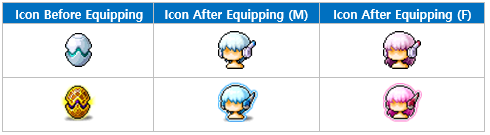
- There are many different types of androids, each with its own grade.
- This determines the item's appearance. When you first equip the item, the icon will change.
05. Other Items
- You can use the android-exclusive Ear Sensor Clips to remove your android's ear accessory.
- You can use Android Name Change Tickets to change your android's name.
06. Android Voice
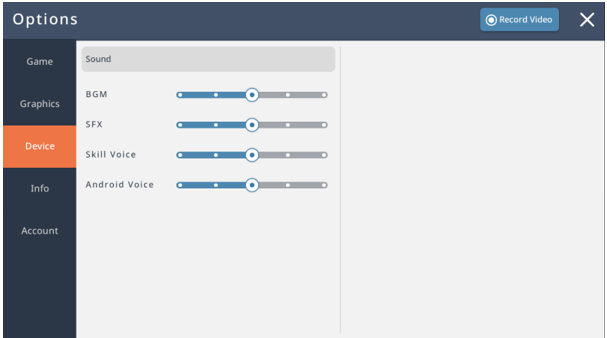
- You can adjust your android's voice volume on the Settings>Device tab.
|
Intro to Mechanical Heart |
01. Mechanical Heart Information
- You need a Mechanical Heart in order for your android to appear. To apply its stats, it must be equipped with your android.
- Permanent Mechanical Hearts provide additional stats.
- The following features are available for Mechanical Hearts at the Forge: Potential reset, Potential rank change, and additional Potential unlock. The following features are not available for Mechanical Hearts: Star Force enhancement, Emblem Potential, equipment level up, and Soul attachment.
- The range of the Potential ranks depends on the grade of the heart. No Mechanical Hearts can be stored/moved in storage or traded at the Trade Station.
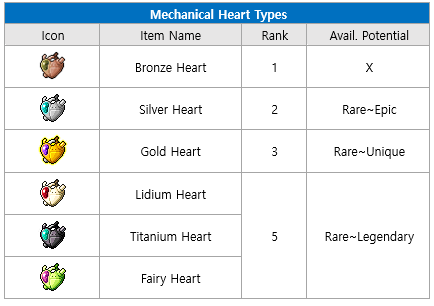
- For Androids, Epic: Rank 3 / Unique: Rank 8 / Legendary: Rank 9
More from this series
This Guides entry belongs to MapleStory M. Related pages below keep this series separate from other MapleStory games.
Source and verification
MPStorys shows the readable on-site body above. The source page remains attached only as a citation and update trail.
MapleStory M Official News