

摘要
“13 Friends and Parties” is an official guide from MapleStory M Official News on 2023-02-06. Its canonical Nexon thread and publication metadata are retained for source-backed verification.
正文
|
Close Friend |
01. Friend Menu
Tap Community in the main menu.
- Nearby Players: You can view the names and levels of other players near your current location.
- Friend: You can view a friend's name, channel, location, and login date. Friend Warp is also available.
- Guild: You can view a guild member's name, level, and login date.
- Party: You can view a party member's name and your current party's level.
- Chat Room: You can view a list of chat rooms you are currently in and the info of other participating players.
02. Add a Friend
To add a player as a friend, just tap to view their info, then tap Invite Friend at the bottom.
- If that player accepts your friend request, you can view their channel and location by tapping Player List > Friends.
- If that player has Invite Friend turned off in the settings, you won't be able to send a friend invite.
* You can turn Invite Friend on and off in the Settings.
- To view a friend's info, tap the (i) button. (This is only available for friends who are online.)
03. Search for a Friend
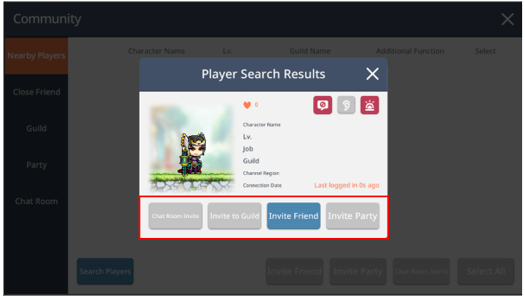
- Tap Community > Search Players to search for a friend.
- If the player you search for is logged in, the following will be available: Chat Room Invite, Invite to Guild, Invite Friend, and Invite Party.
04. Friend Warp
- You can use Friend Warp to teleport to your friend's location.
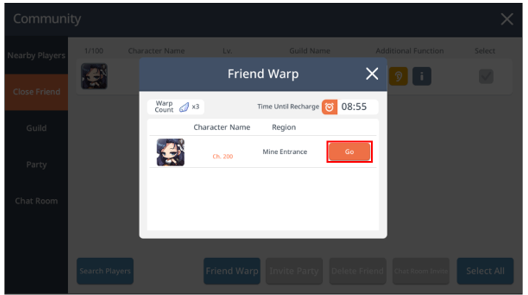
- Tap Community > Friend > Friend Warp.
- Then tap Go to teleport to your friend's location.
- You can only use Friend Warp 3 times per day.
- Remember, if your friend is playing special content, you won't be able to teleport to them.
|
Party |
01. Party Info
If your party plays in the same area, your EXP will be shared, and you can level up your character faster.
02. How to Create a Party
- To create a party, tap Quest > Party > Create.
- You can also join an existing party with Auto-Join.
- Parties must consist of 1–6 players.
- The maximum party size varies by field. (Min. 1 to Max. 6 players)
03. How to Use Party

04. Party Type Info
- Auto-Recruit Party: Recruit players who are looking for a party via Auto-Join.
- Permission Party: Only players approved by the Party Leader can join.
- Password Party: Only players who enter the password set by the Party Leader can join.
05. Appoint Party Leader (Party Leader's Authority)
- To appoint another party member as the Party Leader, go to Player List > Manage Party > Party and choose the party member. Then tap Appoint Party Leader.
- Party Leader authority will be assigned to that party member.
06. Kick Out a Party Member (Party Leader's Authority)
- If you are the Party Leader, you can kick out party members.
- Tap Player List > Manage Party > Kick from Party to kick out a party member.
07. Add a Party Member
- To add a friend to your party, tap Community > Friend, Guild, or Recent Party > Invite Party.
- Recent Party lists party members you played with in previous content.
- However, players who don't meet the level requirements for the content will be hidden.
08. Party Rest
- When you create a party, you can enable or disable Party Rest EXP.
- If Party Rest EXP is disabled, the party will not gain Party EXP if they haven't hunted for a certain period of time.
09. Resting Player Auto-Kick
- When you create a party, you can enable or disable Auto-Kick for resting party members.
- If Auto-Kick is enabled, party members will be automatically kicked if they haven't hunted for a certain period of time.
- If you join a party with Auto-Kick enabled and you take a break from hunting, you will receive a notification informing you that you must hunt monsters within a given time limit.

10. Auto-Recruit Level Limit
- If you set level criteria for characters that join the party, only characters who match that criteria will be automatically recruited.
- If a character levels up and exceeds the level restrictions after they join a party, that character will be automatically kicked from the party.
11. Required Party EXP Obtained (%) Settings
- You can set a minimum requirement for the ‘Party EXP Obtained’ stat for characters joining your party.
- The party leader must also meet this minimum requirement to enable the setting.
- ‘Party EXP Obtained’ stat acquired through buffs is not counted.
12. Minimum Party EXP Obtained Auto-Kick
- When a minimum ‘Party EXP Obtained’ stat is set, an auto-kick option can be enabled. Once activated, members who do not meet the requirement will be auto-kicked.
- If a player joins a party with this restriction and falls short of the requirement, a warning message will appear, giving them a limited time to meet the condition.
- If the character’s ‘Party EXP Obtained’ stat drops below the limit after joining the party, they will be auto-kicked after countdown.

13. Max Party Member Settings
- You can set the maximum number of members allowed to join the party.
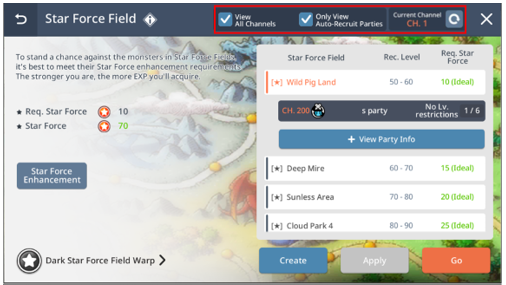
14. Finding a Party through Dungeons > Star Force or Arcane Power Field
- By toggling on/off in View All Channels, you can quickly find a party that was created either in the Current Channel or All Channels.
- You can also toggle between Auto-Recruit and All Parties.
15. Party Hunting EXP Increase Effect (Affected by Number of Party Members)
- You'll receive a Party EXP Increase Bonus based on the current number of party members.
| Number of Party Members | Party EXP Increase Bonus |
| 1 | 20% |
| 2 | 20% |
| 3 | 15% |
| 4 | 10% |
| 5 | 5% |
| 6 | 0% |
16. Item Drops from party Auto-Battle
- When hunting together with other Maplers, monsters defeated by others also drop items.
- The Item Drop Rate of your own Character also applies to monsters defeated by other Maplers.
此系列的更多內容
這筆攻略內容僅屬於 MapleStory M。下方相關頁面也按此系列獨立整理,不會與其他 MapleStory 作品混用。
來源與核驗
上方已在本站顯示可閱讀正文;來源頁面只作為引用與後續更新核驗。
MapleStory M Official News