

Summary
“16 Maple Guide” is an official guide from MapleStory M Official News on 2023-02-06. Its canonical Nexon thread and publication metadata are retained for source-backed verification.
Article body
|
Maple Guide |
01. How to Access
- The Maple Guide is available upon reaching Lv. 50.
- You can view it by selecting [Maple Guide  ] via [Menu].
- The Maple Guide can recommend content based either on your current character's level or for selected levels.
|
Rec. Content |

- Select a level using the level bar to see the [Recommended Hunting Ground] and [Recommended Content] for that level.
- Move the level bar left or right to select a level.
- Recommended hunting grounds and content will be marked by a special icon.
▶ Rec. Hunting Ground
- Check out the hunting ground recommended for the selected level.
- Recommended hunting grounds are displayed based on the selected level and higher.
- Tap on the recommended hunting ground to move to that hunting ground's UI.
▶ Rec. Content
- Check out the content recommended for the selected level.
- You can view the type/difficulty of the recommended content as well as obtainable rewards from the rewards tooltip.
- Tap on the recommended content to move to that content's UI.
▶ Common Icons
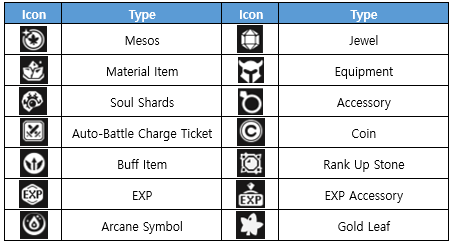
|
Viewing Level-Based Content |

01. Content by Level
- View content available based on level.
- You can view the level requirement/content name/difficulty/obtainable rewards.
- Tap on the recommended content to move to that content's UI.
- Move the level bar left or right to select the level.
02. Content by Level Filter
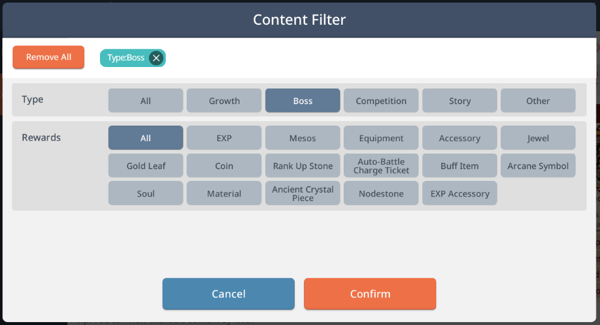
- Tap on the [Content by Level] filter icon to filter content shown.
- Use to filter content by type/reward.
More from this series
This Guides entry belongs to MapleStory M. Related pages below keep this series separate from other MapleStory games.
Source and verification
MPStorys shows the readable on-site body above. The source page remains attached only as a citation and update trail.
MapleStory M Official News