

摘要
“20 Gold Richie’s VIP Premium Trade” is an official guide from MapleStory M Official News on 2023-02-06. Its canonical Nexon thread and publication metadata are retained for source-backed verification.
正文
|
Gold Richie VIP Premium Trade Introduction |
- The Gold Richie VIP Premium Trade service provides a quick, safe way to trade items above the standard Meso limit.
- You can access the VIP Premium Trade service when you purchase the Gold Richie VIP Membership Card from the Cash Store.
|
Gold Richie VIP Membership Card |
- The Gold Richie VIP Membership Card can be purchased through [Cash Shop] – [Game] – [Trade].
- Use the Gold Richie VIP Membership Card to purchase or sell high-value items at the Trade Station.
- The Membership Card will be sent to your bag upon purchase. Use the Membership Card to activate the VIP Premium Trade service for 30 days, during which you can make up to 5 premium trades.
- The VIP Membership Card expires after 14 days, and it cannot be stored or moved to storage.
- The Membership Card will last for 1 month or until you reach the premium trade count limit, whichever comes first.
- The effect of the VIP Membership Card is activated per world. If 30 days have not passed but you have used up all your 5 premium trades, your membership will end. The same applies if you have not used up all your 5 premium trades but the membership period has expired.
|
Gold Richie Coin Bank |
- The Coin Bank can store between 100M and 99.9B Mesos in the form of Coins. Each Coin you store in the Coin Bank is worth 100M Mesos.
- The Coin Bank will appear at the Trade Station. Tap the [Gold Richie] icon to make a deposit or withdrawal.

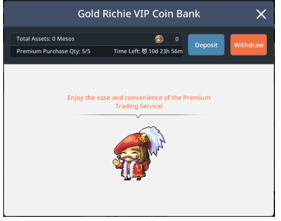
- Coins stored in the bank can be transferred within the world.
- There are no fees for making a deposit or withdrawal at the Coin Bank.
- Once your membership expires, you can only make withdrawals from the Coin Bank.
|
How to Use Premium Trade |
- Both the buyer and seller must have active memberships to make a premium trade.
- You can only trade Legendary or higher weapons, armor, and accessories.
- You can only use Mesos from the Coin Bank to make a premium trade.
- When you sell an item, you can choose between a 1:1 trade or a trade with any active member.
- The Sale Price has a minimum/maximum amount, and you can register up to 3 items for sale at the same time.
- There is no waiting period when you register items for a premium trade.
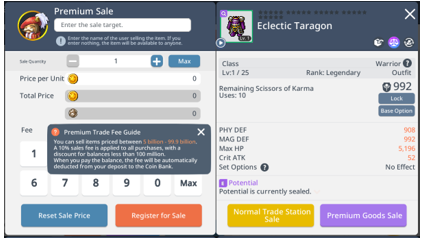
01. How to Register Items for Premium Trade
- Just like the Trade Station, you can register items through the [Sell] tab. Items eligible for premium trade will display a [Premium Trade] button.
- To make a 1:1 trade, enter the player’s name in the [Sell] window.
02. How to Make Purchases through Premium Trade
- If a seller registered an item as Trade with All, it will appear in the [Buy] tab in the Trade Station.
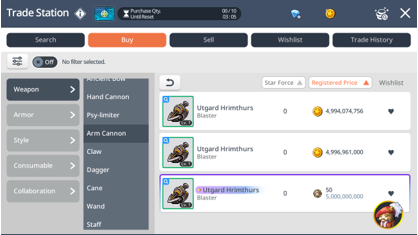
- The gold Richie icon will have an [N] if a 1:1 trade is pending. Tap the [Gold Richie] to view the 1:1 trade.
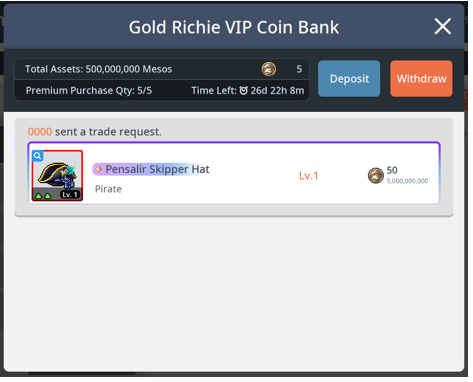
- You can still view 1:1 trade requests after your membership expires.
- You can still receive 1:1 trade requests after your membership expires, but you won't be able to make any purchases.
03. Finalized Sales in Premium Trade
- Sellers can view finalized, registered, and unregistered premium trade items in the [Sell] tab.
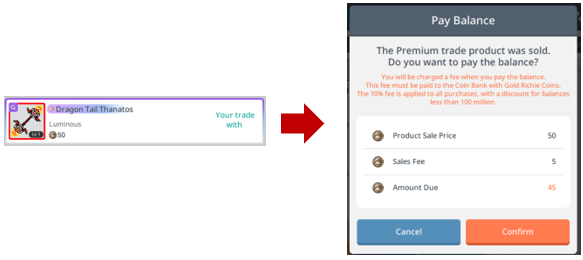
- Tap the sold item registry to complete the transaction. Any fees for the sale will be deducted from your Gold Richie Coin Bank account. Any profits from the sale will be added to your Gold Richie Coin Bank account.
04. Premium Trade Fees
- Like normal trades, premium trades have a 10% transaction fee charged in units of 100M.
- That fee is applied for both completing and canceling transactions.
- There is no fee to register an item, and you won't be charged a fee if the item expires before it is sold.
- Fees must be paid with Coin Bank Coins.
|
Premium Trade FAQ |
1. My VIP membership expired. Can I still complete transactions for items I've sold?
- Even though your membership expired, you can still complete transactions for items you've already sold, re-register or retrieve your items without a fee, or cancel trades.
2. What do I do if I entered the wrong price or player name for a 1:1 trade when I registered it?
- Like normal trades, you can cancel a trade if you pay a fee with Gold Richie Coins from the Coin Bank.
此系列的更多內容
這筆攻略內容僅屬於 MapleStory M。下方相關頁面也按此系列獨立整理,不會與其他 MapleStory 作品混用。
來源與核驗
上方已在本站顯示可閱讀正文;來源頁面只作為引用與後續更新核驗。
MapleStory M Official News