

摘要
“25. Light Sanctum & Stigmata” is an official guide from MapleStory M Official News on 2026-04-01. Its canonical Nexon thread and publication metadata are retained for source-backed verification.
正文
Defeat the MapleStory M Original Boss and collect Stigmata to further enhance your character through Light Sanctum!
|
Light Sanctum & Stigmata
|
01. What is ‘Light Sanctum’?
‘Light Sanctum’ is a growth system at the character level that unlocks upon reaching Lv.200.
By equipping the ‘Stigmata’ Item obtained by defeating Maple M original bosses, you can increase the stats of your character.
- [Menu] > [Light Sanctum] to enter.
02. What is a ‘Stigmata?
▶ How to Obtain
- ‘Stigmata’ is equipment that can be obtained at certain probabilities when defeating Maple M original bosses (Archon, Azazelle). (Can be exchanged)
- Upon defeating a boss once, you can obtain up to 1 Stigmata.
▶ Types of Stigmata acquisition options
| Stigmata/Color | Red | Orange | Blue | Green |
| Archon’s Stigmata | PHY/MAG | Crit DMG | Boss ATK Increase | EXP Increase |
| Azazelle’s Stigmata |
- Stigmatas exist uniquely per boss, such as ‘Archon’s Stigmata’ and ‘Azazelle’s Stigmata’.
- Each boss’s Stigmata is divided into four colors: ‘Red’, ‘Orange’, ‘Blue’, and ‘Green’,
and the type of stats granted is determined by the color of the Stigmata.
- Even with the same color, the stats values differ depending on the boss.
- Stigmatas have Epic and Unique ranks, and the higher the rank, the stronger the stat effects.
▶ Stigmata Preview
| Stigmata/Color | Red | Orange | Blue | Green |
| Archon’s Stigmata |
|
|
|
|
| Azazelle’s Stigmata |
|
|
|
|


|
How to Use Light Sanctum
|
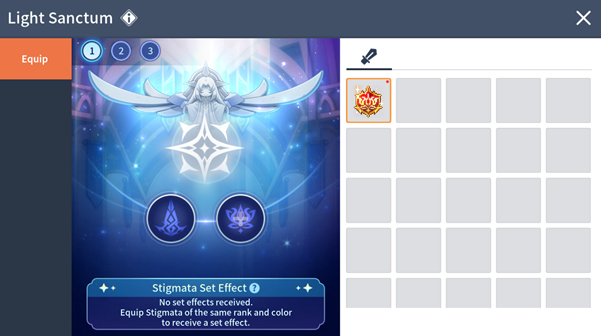
01. Slot Unlock
- 'Light Sanctum' has dedicated slots that symbolize each boss.
- Each slot is unlocked upon reaching the boss's Entry Lv.
- Only the corresponding boss’s Stigmata can be equipped in an unlocked slot.
(e.g.) Only ‘Archon's Stigmata’ can be equipped in the ‘Archon’s Slot’
02. Equip, Switch, Unequip Stigmata
▶ Equip Stigmata
- Among the Stigmatas corresponding to each boss slot, select the Stigmata to equip and press the [Equip] button to equip it.
▶ Switch Stigmata
- If there is a slot with a Stigmata already equipped, equipping another Stigmata will unequip the existing Stigmata and switch it to the new Stigmata.
▶ Unequip Stigmata
- Select an already equipped Stigmata and press the [Unequip] button to unequip it.
03. Stigmata Set Effect
- When equipping 2 or more Stigmatas of the same color, Set Effect is applied.
*However, Set Effect is applied only between Stigmas of the same rank (Epic/Unique), and the boss type does not matter.
| Set Effects | Set | Applied Stats |
| Red Stigmata Set Effect | 2 | Final DMG Increase |
| Orange Stigmata Set Effect | 2 | Crit DMG |
| Blue Stigmata Set Effect | 2 | PHY/MAG DMG Increase |
| Green Stigmata Set Effect | 2 | Item Drop Rate Increase |
|
Notice
|
- In Light Sanctum, you can use a total of 3 presets and change your Stigmata setup according to the situation. (A 5-second cooldown applies when changing presets.)
- Stigmata cannot be upgraded beyond equipment. All Forge functions, including Star Force enhancement and Potential configuration, are unavailable.
- Stats gained from equipping Stigmata can be checked under the Equipment section in [Character Info] > [Stats] > [Detailed Stats].
- Even if you obtain Stigmata through Trade Station, you cannot equip it if the slot has not been unlocked yet. Please unlock the slot first by reaching the entry level requirement of each boss!
此系列的更多內容
這筆攻略內容僅屬於 MapleStory M。下方相關頁面也按此系列獨立整理,不會與其他 MapleStory 作品混用。
來源與核驗
上方已在本站顯示可閱讀正文;來源頁面只作為引用與後續更新核驗。
MapleStory M Official News