

Summary
A first-party map of the MapleStory M in-game interface, covering character and map information, quests and parties, progression menus, Maple Viewer modes, inventory, mail, settings, and shops.
Article body

|
Main In-Game Screen Guide |
(Image updated)
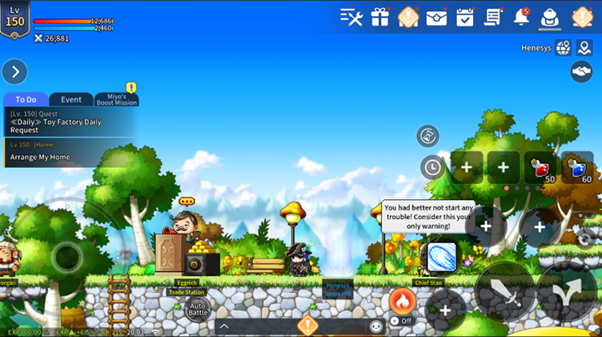
01. Character Information
Check your character's name, level, HP/MP, and combat power.
02. Quest Area
The Quest Area displays quests that can be completed for daily rewards, as well as quests that are currently in progress or available to start.
This area is made up of three tabs.
| Tab Name | Quest Type |
| To-Do | Displays essential or recommended quests, as well as quests that can be completed daily (Tutorial, Adventure Mission, Daily Quest, etc.) |
| Events | Displays events or limited-time events where rewards can be earned (Rest Reward, Attendance Reward, etc.) |
| Miyo's Boost Mission | Displays only Miyo's Boost Mission quests |
03. Road Map/World Map
There are two types of Maps: Road Map and World Map.
- Road Map: Shows the information of the currently located city/town.
- World Map: Shows the information of the currently located continent.
04. Party Button
Tapping this button provides three functions: Create Party, Auto-Join, and Party Search.
Tap [Create Party] to manage your party, send party invites, and use Auto-Recruit.
Tap [Auto-Join] to join a party that has already been created in your current field.
Tap [Party Search] to bring up the World Map and view the list of parties by field.
05. Controller
Use the controller to move forward, backward, left, right, and diagonally.
06. Auto-Battle
Tap [AUTO] to enable auto-battle.
You can view the remaining auto-battle time and the time remaining until reset.
07. Chat
Chat is divided into the following: [World], [All], [Guild], [Party], [Whisper], [Group], and [System].
- World: You can send a message to all channels using a World Megaphone
- All: You can check all the World/Channel megaphone messages, Whispers, Group chats and those messages sent by others located in the same map.
- Guild: This option is only active when you're a member of a guild. Chat with other members of your guild.
- Party: Chat with other players in your party.
- Whisper: Chat privately with a person of your choice.
- Group: Gather any wanted members to create a group and have a chat.
- System: Displays item acquisition history and system messages.
08. Fever Buff
If the gauge is not full, you can purchase a fever buff by tapping on the icon.
If the gauge is full, tap the icon to activate the fever buff.
09. Attack
Tap the attack icon to perform a basic attack.
10. Jump
Tap the jump icon to jump.
11. Skill Hotkeys
You can assign frequently-used skills to hotkeys.
Skills assigned to a hotkey can be used manually.
12. Item Hotkeys
You can assign HP/MP recovery items to item hotkeys.
13. Menu Shortcut
Tap the menu shortcut to access Options, Bag, Quests, and other features.
14. Device Information
Check your network status and the current time.
15. EXP Information
Check your current EXP (%) to estimate your next level up.
|
Detailed Menu |
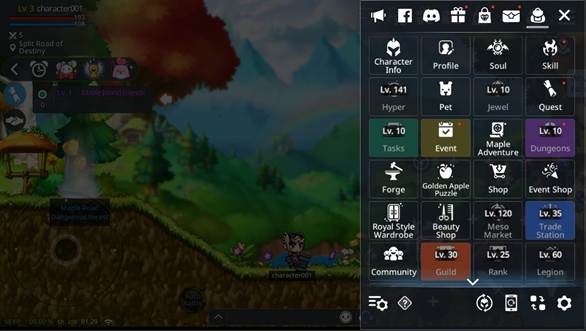
01. Character Info
You can view the character's abilities.
02. Profile
You can view the currently equipped item info, style info, pet into and jewel info.
03. Soul
You can extract souls and fuse soul shards
04. Skill
You can view your character’s active, buff, and passive skills.
You can level up a skill if you have enough SP (Skill Points). You can also view more detailed skill info and register skills to a hotkey.
05. Hyper
You can invest your hyper stat points to enhance your character’s strength.
06. Pet
You can manage your pets, feed them, and set their skills.
07. Jewel
You can equip and fuse jewels, and craft a master jewel.
08. Quest
You can check the list of open quests, including the one you're currently on.
09. Tasks
You can receive rewards by taking on Daily Missions, Weekly Missions, Daily Hunt, Achievements, and Cygnus’s Missions.
10. Event
You can check the currently on-going list of events.
You can receive special event rewards, such as Login Rewards, Rest Rewards, and Attendance Rewards.
11. Dungeons
You can access various dungeons like Daily Dungeon and Mini Dungeon.
12. Forge
You can access various forge menus including Level Up, Star Force Enhancement, Exalt, Refine, Accessory Enhancement, and more!
13. Golden Apple Puzzle
You can collect and assemble Golden Apple Puzzle Pieces to claim rewards.
14. Shop
You can access various shop menus:
- Meso shop : can be bought with mesos
- Gold Leaf shop : can be bought with gold leaf, and includes equipment material, dungeon tickets, jewel boxes, and potions
15. Royal Style Wardrobe
You can check the Royal Style sets and Master Label sets.
16. Beauty Shop
You can change your character’s hair and face, as well as access your owned mannequins.
17. Meso Market
You can purchase and sell mesos to/from other Maplers
18. Trade Station
You can sell items from your inventory, or buy other registered items.
19. Community
You can check nearby players, any close friends, guid members/party members and chat rooms.
20. Guild
You can join a guild or create a guild as a guild master.
If you’re already in a guild, you can view guild info/rank/member info/guild attribute/guild skills etc. and utilize the guild estate as well as contributing in the various guild contents.
21. Rank
You can view the rank overall/among friends/among guild members as well as your character’s rank.
22. Legion
You can view the number of characters in the current World, as well as the cumulative level effect and the synergy grid conquest effect.
23. Android
You can equip/unequip any androids you own.
24. Monster Collection
You can check the list of discovered/undiscovered areas and go for an exploration.
25. V Matrix
You can manage, enhance, extract and craft V Cores.
26. Arcane Symbol
You can equip and enhance any owned arcane symbols
27. Styling
You can manage any owned damage skin, emotes, mount and chairs.
28. Maple Guide
Maple Guide recommends any hunting grounds and contents depending on your character level.
29. Change Character
You can see the currently connected World/Character info, as well as switch back to the selection window or to the Title screen, and change chanracters.
30. Maple Viewer
You can select and change the UI mode between auto-Battle, Manual Battle, Boss Battle, Screenshot and Sleep Screen modes.
31. Options
You can view and change any account or game settings.
32. Bag
You can check any equipped items and items you currently own in your inventory. The Bag tabs are divided into different item types.
33. Mail
The Mailbox is categorized into [Defualt] and [Personal]. The [Default] mailbox contains items that can be viewed and claimed by all characters of an account, and the [Personal] mailbox contains items that can be viewed and claimed only by the individually-received character.
34. Cash Shop
You can buy various game, pet, style, hair/face related items with your crystals.
35. Package
You can buy products that help your character grow stronger.
More from this series
This Guides entry belongs to MapleStory M. Related pages below keep this series separate from other MapleStory games.
Source and verification
MPStorys shows the readable on-site body above. The source page remains attached only as a citation and update trail.
MapleStory M Official News