 MapleStory MGLB
MapleStory M Change Options Guide

Summary
Official potential-option guidance explaining appraisal, cubes and scrolls, option grades, equipment restrictions, Meso costs, manual rerolls, and the automatic option-change function.
Article body

You can change and enhance potential abilities by changing options.
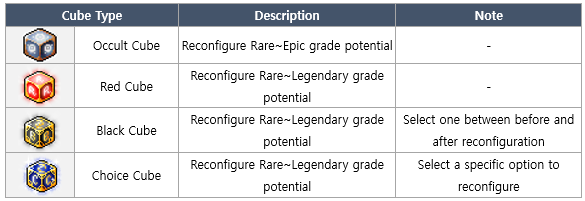
By appraising potential abilities and using cubes or scrolls, you can increase the grade of potential abilities and obtain powerful options.
There is a low probability that the potential grade will increase depending on the cube type.
You can make potential options a unique grade through the Unique Potential Scroll, and if the equipment is of Mythic grade or higher and has unique grade potential options, you can make it Legendary grade potential ability through the Legendary Potential Scroll.

Introduction to Change Options
- You can change items’ potential/options via [Bag > Equipment > Forge] or [Main Menu > Forge > Change Options].
- Options and their numbers differ for different equipment pieces.
- Changing options consumes a certain amount of Mesos and Cubes.
How to Change Options
- Select equipment with its options appraised and use Cubes to change options.
Step 1. Select the base item you want to change.
Step 2. Select the Cube you want to use.
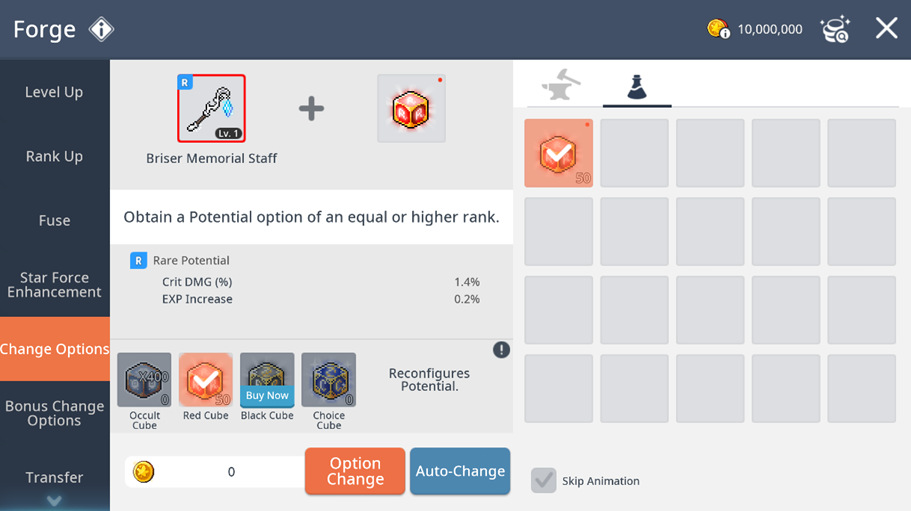
| ★ TIP! - You can only change potential/options of an appraised item. - Currently locked equipment’s’ options cannot be changed. - If an item’s potential is unique or a higher rank, Occult Cubes cannot be used. - If you don't have a Red Cube or Black Cube, a ‘Buy Now’ button is added to take you directly to the shop. - If you use Potential Scroll to change options, the previous options will be changed so be careful. |

Auto-Change Function
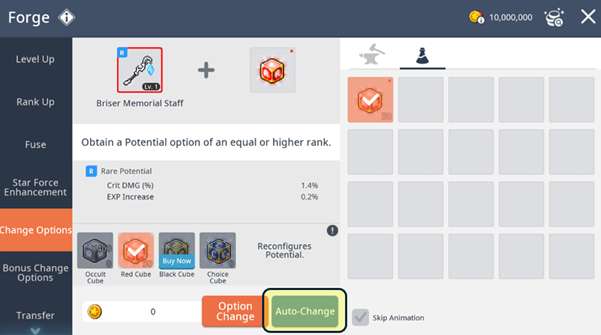
- This feature allows you to automatically use your owned cubes repeatedly until you reach the desired potential rank or option.
Step 1. Select the item to appraise its potential and choose the cube to use, then press the [Automatic Rank Up] button.
Step 2. Choose the desired potential rank and set the maximum number of cubes to use.
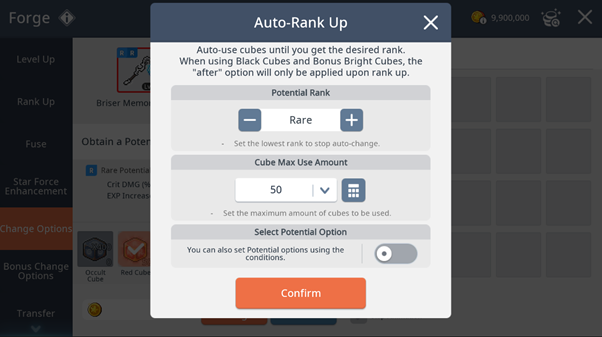
▶ Adding Desired Option Filter
Step 3. When the Potential Option Selection Filter is activated (OFF → ON), the UI expands, allowing you to select both the number of option lines and the types of options to appear.
- The number of option lines can be set up to a maximum of three, depending on the number of potential lines the item currently has.
(You can set up to three lines only if the number of potential lines has been expanded to three using the Potential Stamp.)
- The types of options can be selected without restriction, and multiple options can be chosen. If multiple instances (lines) of any of the options set as appearance conditions appear, each instance (line) will count toward the condition.
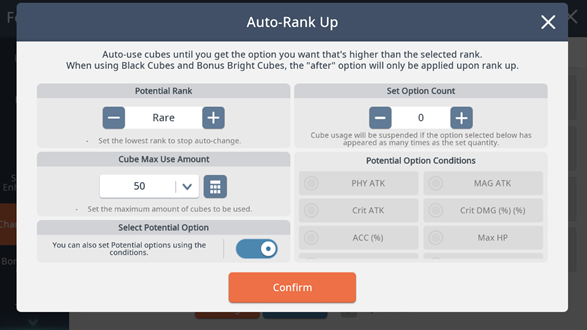
* When using Black Cubes for automatic change, if the option conditions you set are not met but the potential rank increases, the new options will be automatically selected. After the automatic change, the system will continue to reroll until the set conditions are met. In all other cases where the set conditions are not satisfied, the previous options will be automatically retained.
* You cannot use Choice Cube for Automatic change.
* When the potential rank is Unique or lower, you cannot set Legendary rank as a condition. (Potential can only be upgraded to Legendary using a Legendary Potential Scroll.)
More from this series
This Guides entry belongs to MapleStory M. Related pages below keep this series separate from other MapleStory games.
Source and verification
MPStorys shows the readable on-site body above. The source page remains attached only as a citation and update trail.
MapleStory M Official News