 MapleStory MGLB
MapleStory M Equipment Level Up Guide

Summary
Official equipment-leveling instructions explaining Forge access, material EXP, Meso costs, rank-dependent maximum levels, Exalt expansion, and the progression paths unlocked at maximum level.
Article body

Leveling up is the most basic aspect of enhancing your power.
You can increase ATK and secondary options of weapons, as well as DEF and secondary options of armor.
Depending on the equipment rank, you can use the Rank Up, Fuse, and Mastercraft functions upon reaching the MAX level.
Equipment of Legendary rank or lower can be ranked up or fused to increase their rank upon reaching the MAX level.
Equipment of Mythic rank or higher can be mastercrafted to make an Ancient or Chaos rank upon reaching the MAX level.
If you lack materials, you can obtain refining powder and equipment from Elite Dungeon and use them.

Introduction to Level Up
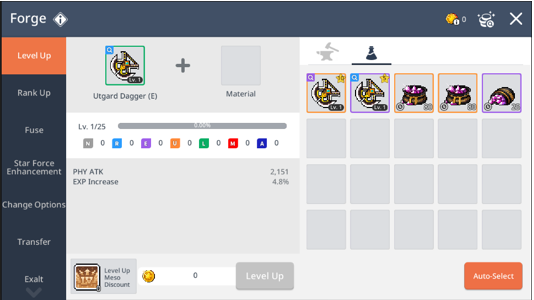
- You can level up an equipment via [Bag > Equipment > Forge] or [Main Menu > Forge > Level Up].
- You can choose a weapon or an armor equipment to level up.
- Higher rank items used as a material will contribute a higher material exp to level up.
- Level Up consumes a certain amount of mesos depending on the amount of material items used.
Maximum Levels with Ranks
- The maximum level for weapons and armors differs depending on the item rank.
- For Mythic or higher rank equipment, you can expand their maximum levels by exalt.
| Equipment Rank | Normal | Rare | Epic | Unique | Legendary | Mythic | Ancient | Chaos |
| Max Lv. | 5 | 10 | 15 | 20 | 25 | 30 | 30 | 40 |
| Max Lv. with Exalt | - | - | - | - | - | 40 | 50 | 60/70 |
* Chaos-rank Arcane Umbra equipment can be leveled up to Lv. 70.
How to Level Up
- Select a base weapon or an armor equipment to level up, and use material items to increase EXP on the selected equipment.
- You can use items for materials that are the same type as the base item, or also can use Whetstone/Refining Powders.
Step 1. Register the weapon or armor item that you want to level up.
Step 2. Register all material items to be used or select them individually.
| ★ TIP! - Currently equipped or locked equipment can be registered as a base item, but cannot be registered as a material item. - To register a locked item as a material, click on the item and unlock. |
More from this series
This Guides entry belongs to MapleStory M. Related pages below keep this series separate from other MapleStory games.
Source and verification
MPStorys shows the readable on-site body above. The source page remains attached only as a citation and update trail.
MapleStory M Official News