 MapleStory MGLB
MapleStory M July 8/9, 2026 Patch Notes

Summary
The July 8/9 update revised the main UI and quest tabs, improved tutorial and Adventure Mission flows, corrected Sol Erda party drops, adjusted Star Force Field party play, and introduced account-link, treasure-box, and package events.
Article body
[Fix and Improvements related to Sol Erda]
[Developer’s Comment]
Sol Erda Fragments and Sol Erda Energy have not been dropping from monsters defeated by party members, and this will be fixed. We sincerely apologize for the delay in accurately identifying and addressing this situation.
For more details, please check the [separate notice].
Along with the Sol Erda Fragment and Energy drop fix, the party hunting and party size improvements that had been under review will also be applied.
1. Fixed an issue where Sol Erda Fragments and Sol Erda Energy did not drop from monsters defeated by party members
- Fixed an issue so that Sol Erda Fragments and Sol Erda Energy now also drop from monsters defeated by party members.
- For monsters defeated by party members, drops are determined based on your own Item Drop Rate.
2. Improved Party EXP for 1-person party hunts / Bonus Party EXP applied based on party size
- Improved so that you can receive full EXP even in fields without a party, ensuring there is no disadvantage in cases such as being forced to hunt as a 1-person party when a party member leaves during background Auto-Battle.
- Changed so that any Party EXP Increase options you hold are also applied while playing solo.
- While playing solo, the same +20% Party EXP Increase bonus as a 2-person party is applied.
- Party EXP Increase options are not applied in Single-Player Dungeons (Forest of Erda, The Edge of Space, Mini Dungeon).
3. Change to the maximum party size in Sacred Power Fields
- Following this issue, we conducted a series of tests on item drops under various party conditions. In particular, we found that when hunting in a party of 5 or more with a Petite Luna pet equipped, an individual's own monster kill count drops sharply. As a result, players are unable to trigger the Fever Buff, which in turn causes a sharp decrease in the amount of Sol Erda Fragments and Sol Erda Energy obtained. To ensure that even Maplers who are unaware of hunting efficiency mechanics can hunt without any disadvantage, we have set the maximum party size to 4.
- The maximum party size that can be created in the Sacred Power Fields below will be changed to 4 members.
| Field Name | Required Sacred Power Value |
| Baffling Garden | 10 |
| Rimy Flume | 20 |
| Valley of Silence | 30 |
[New Content]
1. Tutorial
1. Tutorial revamp
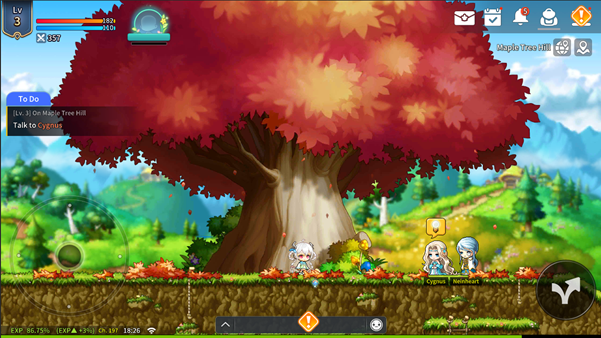
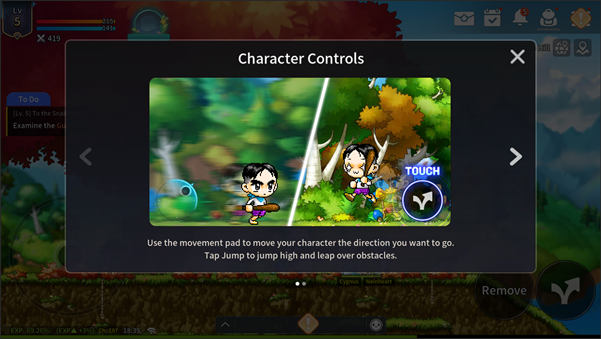
- Tutorial starting upon creating a new character will be revamped.
- All Jobs will now proceed with a unified tutorial on Maple Island.
- Upon completing the Tutorial, your character can reach Lv.100, and you can obtain Tutorial Rewards while progressing through the Tutorial.
* The existing Job-specific tutorials will be changed into Job-specific Epic Quests.
* Since characters can now quickly grow up to Lv.100 through the Tutorial (or Adventure Missions), the existing [Adventurous Training Grounds] content has been removed.
2. Tutorial Selection and Skip
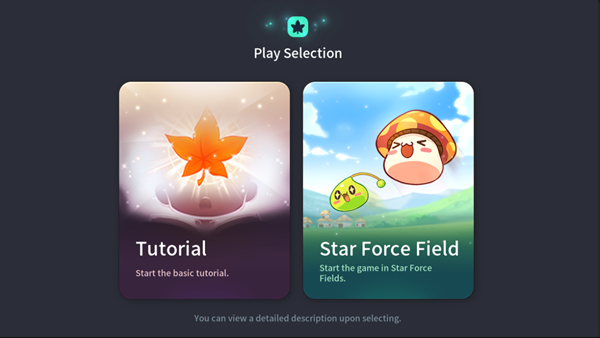
- After creating a character, you can choose whether to proceed with the [Tutorial].
- If you skip the Tutorial, you will be moved to a Star Force Field and start by progressing through the newly added Adventure Missions.
2. Adventure Mission
- Adventure Missions have been added to make it easier to check the goals and rewards needed for character growth. Adventure Missions are new growth guide-style missions that provide step-by-step objectives for your character's level and progress. When you complete missions, you'll be granted rewards that help with character growth.
1. Adventure Mission Details
- In Adventure Missions, you can progress in stages through content necessary for character growth, such as leveling up, battling, equipment growth, required quests, and accessing important content.
- Both new and existing characters will be given Adventure Missions appropriate for their level.
* Accordingly, the Adventure Mission you start with may vary depending on your character's level.
* However, for characters that play the shared tutorial, Adventure Missions appropriate for their level will be available after completing the shared tutorial.
* For boss clear Adventure Missions, missions proceed sequentially by boss difficulty, and the next mission begins once you obtain the reward after defeating the boss. In addition, the mission is only completed if you clear the boss while the mission is in progress.
▶ Check Adventure Missions
You can view Adventure Missions at the center of the left side of the main screen.
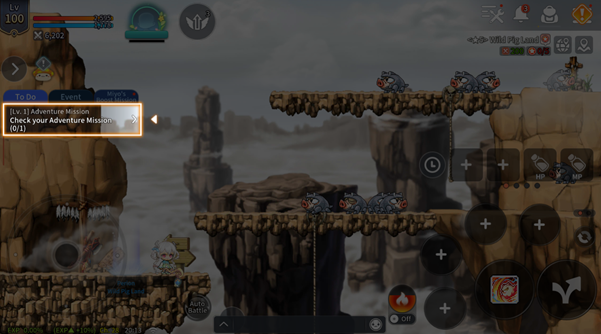
- Tap the [Arrow] button at the far right of the panel to view mission objectives, progress, and reward info at a glance and navigate directly to required content.
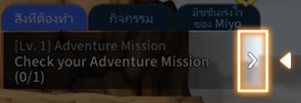
* For some missions, the content will change depending on the character's level.
(Ex. When a character reaches Lv. 200, "Defeat monsters at a Star Force Field" → changes to "Defeat monsters at an Arcane Power Field")
▶ Adventure Mission Rewards
- Upon completing missions, you can get basic rewards such as EXP and Red Meso, as well as items that help your character grow.
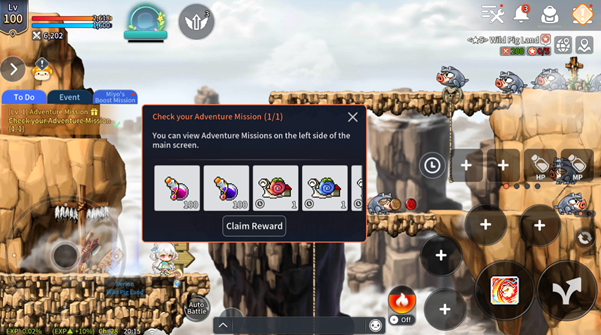
▶ Skip Adventure Missions
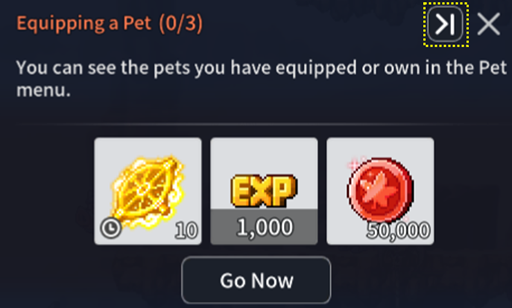
- If there is a difference of 50 or more between the level of the current Adventure Mission in progress and your character's level, you can use the mission's [Skip] feature. Even if you [Skip] the mission, you will still receive all rewards.
The Skip button ( ) appears in the top-right corner of the Mission Details pop-up when the conditions are met.
2. Growth Support for All Reward Changes
- As rewards required for character growth have been added to Adventure Missions, the level requirements for getting free/paid rewards from Growth Support for All will be changed, as well as certain item contents.
- The reward changes will apply to characters created after the update, while existing characters currently using Growth Support will keep the original rewards. Please check in-game for details.
[Content Improvements]
1. Main UI Improvements
1. UI Changes
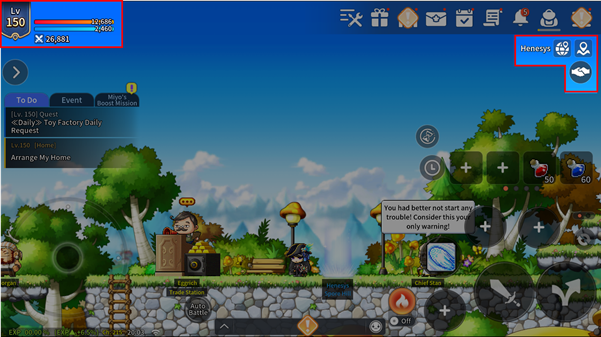
- The UI and button positions for elements such as Character Info and Current Location (World Map) have been changed.
- You can view your character level, nickname, and Combat Power in the top left.
- You can view your current location, party, and map information in the top right.
2. Quest Button Improvements
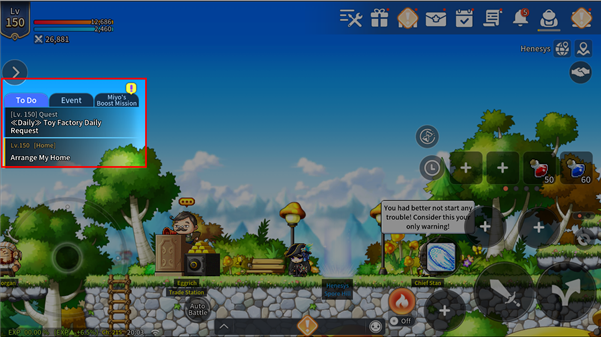
- The existing quest button will be removed, and the following three tabs will be added.
| Tab Name | Quest Type |
| To Do | Displays required or recommended quests and daily quests that are available every day, or Display Tutorial, Adventure Mission, etc. (Tutorials, Adventure Missions, Daily Quests, etc.) |
| Event | Displays events where you can earn rewards or limited-time events (Rest Rewards, Attendance Rewards, etc.) |
| Miyo's Boost Mission | Displays only Miyo's Boost Mission quests |
* The types of quests displayed may be added to or changed in the future.
* Quests that are not displayed can be viewed and progressed in the Quest menu.
3. Progress Information
- If you start Auto-Battle or enter a content, progress information will appear instead of quest information.
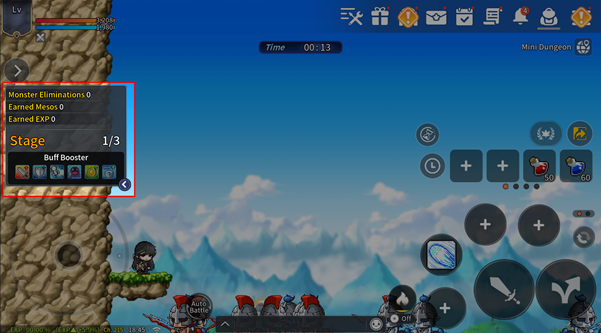
* If you want to view the quest information again, tap the  button to change.
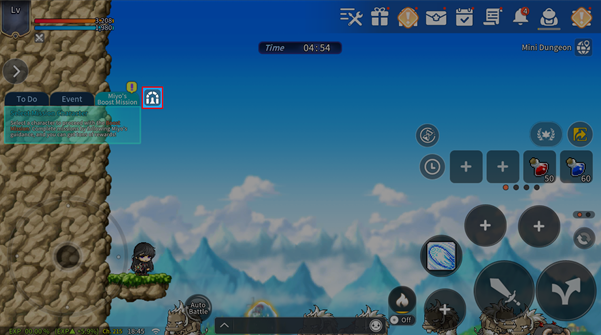
* If you want to view content progress information, tap the button on the right of the tabs.
4. Miyo's Boost Mission Improvement
- Miyo's Boost Mission will be separated into its own tab.
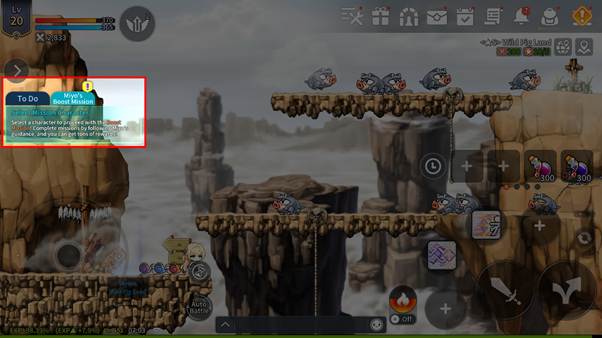
- When Miyo's Boost Mission is available to be assigned, the highlight effect is enhanced, and the popup guiding you to assign Miyo's Boost Mission will appear more frequently.
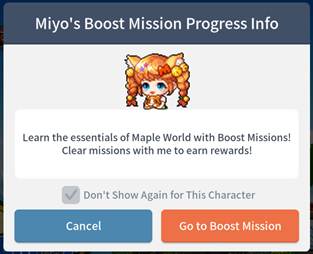
* If you check the "Don't Show Again for This Character" checkbox, the popup will no longer appear on that character.
- When Miyo's Boost Mission rewards are available to claim, a gift box icon will be displayed on the tab. If rewards are available to claim even during Auto-Battle or while progressing through content, a gift box icon will be displayed above the  button.
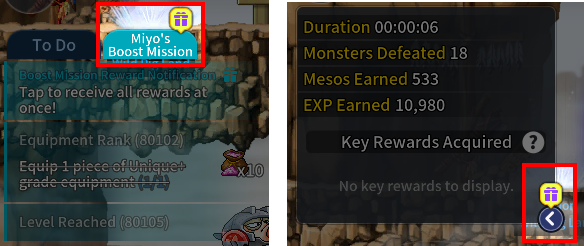
- Among Miyo's Boost Missions, all missions related to the "Adventurous Training Grounds" will be replaced with "Star Force Field" missions.
2. Quest Alert Window Improvements
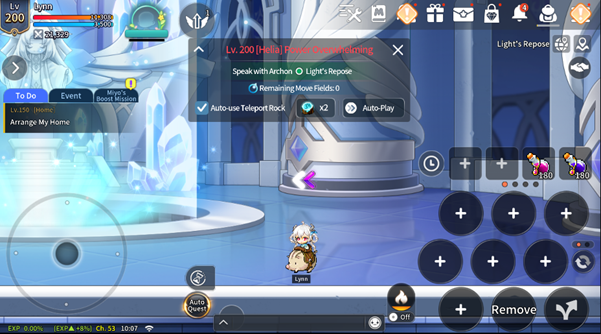
- The quest panel that was displayed on the left will be changed to [Quest Alert Window].
- The Quest Alert Window is shown at the top center of the screen and only displays your one quest that's currently in progress.
- You can start a quest from [Adventure Missions] or [Quest List].
- The Navigation Alert Window will be improved as well.
3. Quest Dialogue UI Improvements
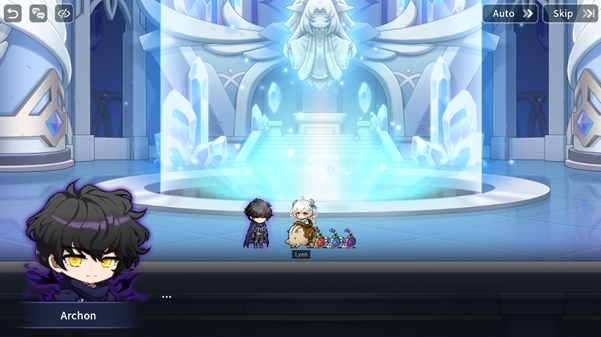
- The UI for quests, BlockBuster, Story Exploration, Grand Athenaeum, and NPC dialogue has been improved.
- The skip, auto-play, chat log, and hide UI features are also applied to the dialogue UI.
4. Star Force Field Improvements
1. Battle Condition
- Star Force Fields can now be entered starting from Lv. 3.
- Star Force Fields require Combat Power and Star Force, and upon entry, the type-specific field effects are applied based on the values you have reached.
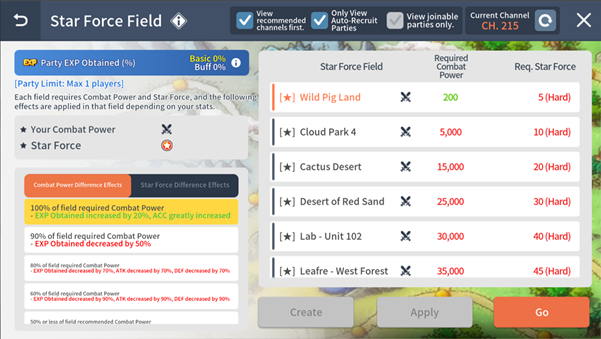
* A Recommended icon ( ) is displayed on Star Force Fields that meet all conditions.
| Type | Conditions | Provided Effect |
| Star Force | Required value reached | No reduction in Mesos and items obtained |
| Required value not reached | Mesos and items obtained greatly decreased | |
| Combat Power | 100% or higher reached | EXP Obtained +20% Increased, ACC increased |
| 90% reached | Decreases EXP Obtained by 50% | |
| 80% reached | Decreases EXP Obtained by 70%, ATK by 70%, DEF by 70% | |
| 60% reached | Decreases EXP Obtained by 90%, ATK by 90%, DEF by 90% | |
| Less than 50% | Decreases EXP Obtained by 99%, ATK by 99%, DEF by 99% |
2. Star Force Field Party Size Adjustment and Field Changes
- The number of players allowed in a party is configured differently for each Star Force Field, and some Star Force Fields will be added / removed.
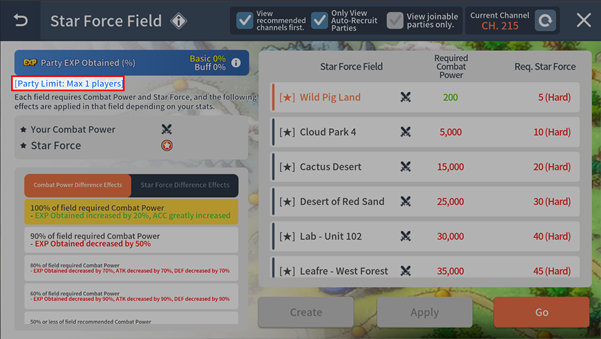
* Star Force Fields can be found under [Menu] – [Dungeons] – [Star Force Field] and on the World Map.
| Field | Party Limit | Required Combat Power | Required Star Force | Change |
| Wild Pig Land | Cannot Party | 200 | 5 | Newly Added |
| Cloud Park 4 | Cannot Party | 5,000 | 10 | Newly Added |
| Cactus Desert | Cannot Party | 15,000 | 20 | Newly Added |
| Desert of Red Sand | 2 | 25,000 | 30 | Newly Added |
| Lab - Unit 102 | 2 | 30,000 | 40 |
|
| Leafre - West Forest | 2 | 35,000 | 45 |
|
| Sky Nest | 3 | 40,000 | 55 |
|
| Battlefield of Water and Darkness | 3 | 43,000 | 65 |
|
| The Forest That Disappeared | 3 | 45,000 | 75 |
|
| Dangerous Dragon Nest | 4 | 48,000 | 80 |
|
| Eos Tower Entrance | 4 | 50,000 | 90 |
|
| Helios Tower Entrance | 4 | 53,000 | 100 | Star Force Required Changed (105 -> 100) |
| Sky Terrace (2) | 4 | 55,000 | 110 |
|
| (Apparatus Room) | 4 | 58,000 | 113 |
|
| Whirlpool of Time | 4 | 60,000 | 115 |
|
| Memory Lane 4 | 4 | 63,000 | 118 |
|
| Road to Oblivion 4 | 5 | 75,000 | 120 |
|
| Deep in the Sky Forest | 5 | 85,000 | 123 |
|
| Wild Bear Area 2 | 5 | 90,000 | 126 |
|
| Goblin Forest 1 | 5 | 95,000 | 128 |
|
| Isolated Swamp | 5 | 100,000 | 130 |
|
| 100-Year-Old Herb Garden | 6 | 110,000 | 133 |
|
| Mutant Training Forest | 6 | 120,000 | 136 |
|
| Drill Hall | 6 | 140,000 | 139 |
|
| Armory | 6 | 160,000 | 142 |
|
| Gale Plateau | 6 | 180,000 | 144 |
|
| Rough Canyon | 6 | 200,000 | 147 |
|
| Western Region of Mossy Tree Forest | 6 | 220,000 | 150 |
|
| Fairy Forest 1 | 6 | 240,000 | 153 |
|
| Dead Tree Forest 2 | 6 | 280,000 | 158 |
|
| Dead Mine 2 | 6 | 320,000 | 165 |
|
| Cave of Trials 1 | 6 | 380,000 | 168 |
|
| Cave of Trials 2 | 6 | 400,000 | 171 |
|
| Great Darkness Forest 3 | 6 |
|
| Field Removed |
| Dino Crossroads | 6 |
|
| Field Removed |
| Specter Haunt | 6 | 500,000 | 180 |
|
| Dark Area | 6 | 600,000 | 184 |
|
| Split Time | 6 | 750,000 | 194 |
|
3. Other UI and Popup Improvements
▶ UI
- The Star Force Field you have entered will display the required Combat Power and required Star Force values.
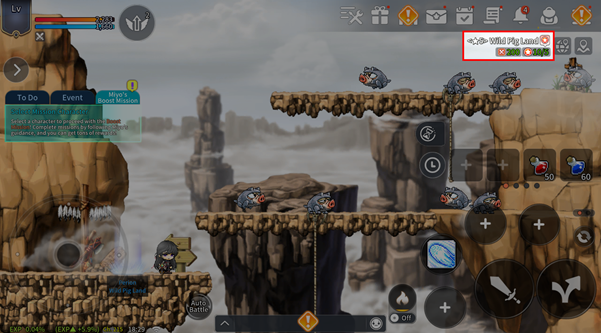
* If your Combat Power and Star Force values are higher than the requirements, they are displayed in green.
* If your Combat Power and Star Force values are lower than the requirements, they are displayed in red.
* The required Combat Power and required Star Force values can be checked in the top-right corner.
▶ Star Force Field Move Popup
- If you are able to move to a higher-tier Star Force Field than the one you are currently in, a move popup will appear.
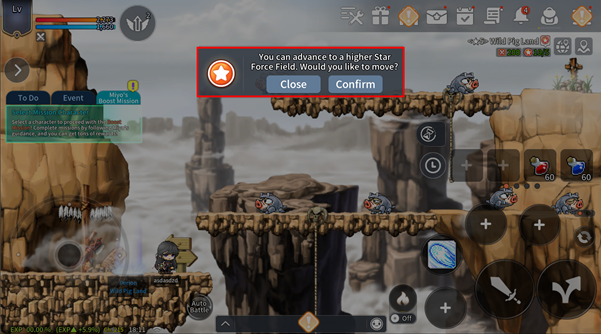
* The move popup is a convenience feature that moves you to the field most recommended for your current character.
* When you tap the confirm button, you will be moved to a higher-tier Star Force Field that meets all conditions (Star Force and Combat Power), and you will automatically join a party.
* When you tap the close button, the move popup can be closed, and it can be brought up again by tapping the field information area in the top-right corner.
5. Content Unlock Level Adjustment
- The unlock levels of some menus will be changed, and menus will be improved to primarily display content that has already been opened.
- The sub-menus within the Forge will be changed so that they can be unlocked based on level.
- The unlock levels of some content in Dungeons will be changed, and menus will be improved to primarily display content that has already been opened.
1. Menu Unlock Level Changes
- Improved so that only menus that have reached their unlock level are displayed. However, some menus will still be displayed in a locked state, as before.
- The unlock levels and display conditions of some menus will be adjusted as shown below.
| Menu | Previous Unlock Level | Changed Unlock Level | Menu Display Condition |
| Soul | Lv.1 | Lv.80 | Shown when level is reached |
| Jewel | Lv.10 | Lv.100 | Shown when level is reached |
| Rank | Lv.25 | Lv.105 | Shown when level is reached |
| Fog Forest Training Grounds | Lv.1 | Lv.200 | Shown when level is reached |
| Dungeons | Lv.20 | Lv.1 | Always Shown |
| Hyper Stat | Lv.141 | Lv.141 | Shown when level is reached |
| Party Search | Lv.100 | Lv.100 | Shown when level is reached |
| V Matrix | Lv.200 | Lv.200 | Shown when level is reached |
| Arcane Symbol | Lv.200 | Lv.200 | Shown when level is reached |
| Home | Lv.150 | Lv.150 | Shown when level is reached |
| Maple Guide | Lv.100 | Lv.100 | Shown when level is reached |
| HEXA Matrix | Lv.250 | Lv.250 | Shown when level is reached |
| Sacred Symbol | Lv.250 | Lv.250 | Shown when level is reached |
| Light Sanctum | Lv.200 | Lv.200 | Shown when level is reached |
* If a character below Lv. 100 had a Jewel equipped before the update, its option remains applied, and once the character later reaches Lv. 100 or above, it can be unequipped or changed.
* [Craft Soul, Extract Soul, Fuse Soul Shards, Soul Skill Info] within the Soul menu are restricted below Lv. 80, but equipping Souls remains available from the Inventory without a level requirement, as before.
* Content that unlocks only after additionally clearing a specific quest — such as the V Matrix and Arcane Symbols — will be displayed in a locked state once the level condition is met, and the menu will be unlocked after that quest is also cleared.
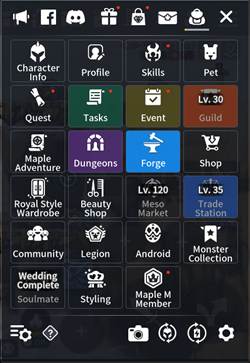
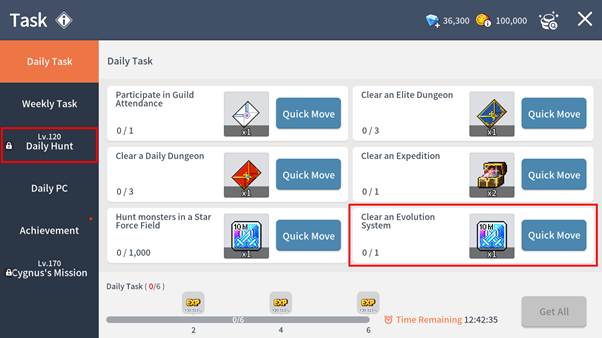
- The level requirement for [Menu] – [Task] – [Daily Tasks] will be adjusted from Lv. 100 to Lv. 120.
- The [Clear Daily Hunt] mission that appeared as a Daily Task at Lv. 100 will be changed.
| Mission Before | Mission After |
| Clear Daily Hunt 2 times | Clear an Evolution 1 time |
2. Forge Level Changes
- Improved so that each sub-menu of the Forge has its own open level applied.
- Menus that have not been opened will be changed so that they are no longer displayed even in the left-side tab within the Forge.
| Menu | Previous Open Level | Changed Open Level |
| Level Up | Lv.1 | Lv.1 |
| Star Force Enhancement | Lv.1 | Lv.1 |
| Exalt | Lv.1 | Lv.150 |
| Refine | Lv.1 | Lv.130 |
| Accessory Enhancement | Lv.1 | Lv.80 |
| Change Options | Lv.1 | Lv.1 |
| Bonus Change Options | Lv.1 | Lv.100 |
| Emblem | Lv.1 | Lv.110 |
| Rebirth Flame | Lv.1 | Lv.80 |
| Scroll | Lv.1 | Lv.1 |
| Rank Up | Lv.1 | Lv.80 |
| Fuse | Lv.1 | Lv.100 |
| Mastercraft | Lv.1 | Lv.140 |
| Transfer | Lv.1 | Lv.35 |
| Alchemy | Lv.1 | Lv.140 |
3. Dungeons Improvements
- The Adventurous Training Grounds content will be discontinued, and accordingly, the "Miyo's Boost Mission" related to the Adventurous Training Grounds will be removed.
- Some content that does not meet the level requirement will be improved to be hidden from the Dungeons list. However, some content will still be displayed in a locked state, as before.
- The open levels and hidden status of some content will be adjusted as shown below.
| Dungeon Type | Previous Open Level | Changed Open Level | Menu Display Condition |
| Star Force Field | Lv.50 | Lv.3 | Always Displayed |
| Mini Dungeon | Lv.100 | Lv.120 | Always Displayed |
| Expedition | Lv.100 | Lv.100 | Always Displayed |
| Story Exploration | Lv.100 | Lv.100 | Displayed on Lv.80 |
| Cooking with Tangyoon | Lv.100 | Lv.100 | Always Displayed |
| Mu Lung Dojo | Lv.105 | Lv.105 | Always Displayed |
| Evolution | Lv.110 | Lv.100 | Displayed on Lv.80 |
| Kerning M Tower | Lv.110 | Lv.110 | Always Displayed |
| The Legends Return | Lv.110 | Lv.110 | Displayed upon unlock |
| Lord Pirate | Lv.120 | Lv.120 | Displayed upon unlock |
| Dimension Invasion | Lv.130 | Lv.130 | Always Displayed |
| Monster Park | Lv.140 | Lv.140 | Displayed on Lv.100 |
| BlockBuster | Lv.140 | Lv.140 | Displayed on Lv.100 |
| Root Abyss | Lv.150 | Lv.150 | Always Displayed |
| The Edge of Space | Lv.170 | Lv.170 | Displayed on Lv.140 |
| Arcane Power Field | Lv.200 | Lv.200 | Displayed on Lv.170 |
| Arcane River Dungeons | Lv.200 | Lv.200 | Displayed on Lv.170 |
| Pharaoh's Treasure | Lv.200 | Lv.200 | Displayed upon unlock |
| Grand Athenaeum | Lv.200 | Lv.200 | Displayed on Lv.170 |
| Forest of Erda | Lv.220 | Lv.220 | Displayed on Lv.200 |
| Sacred Power Field | Lv.250 | Lv.250 | Displayed on Lv.230 |
| Hairos' Seal | Lv.250 | Lv.250 | Displayed on Lv.230 |
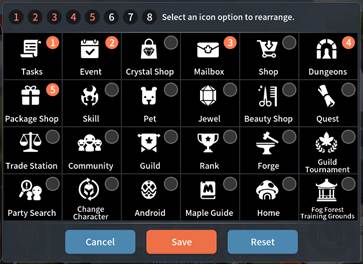
4. Quick Menu Improvement
- Default setting for the Quick Menu will be changed.
| Number | Quick Menu Before | Quick Menu After |
| 1 | Crystal Shop | Tasks |
| 2 | Mailbox | Event |
| 3 | Package Shop | Mailbox |
| 4 | Party Search | Dungeon |
| 5 | Maple Guide | Package Shop |
[New Events]
1. Maple M Account Link Event
For players who are passionate about MapleStory!
Link your PC version of MapleStory with Maple M and earn rewards!
Event Period
2026/07/09 (Thu) After Update - 2026/08/26 (Wed) 09:59 (Server Time)
* Server Time Standards: America UTC-8 | Europe UTC+2 | Asia 1&2 UTC+8
Event Details
[How to Participate]
① You can participate in the event through the [Menu] > [Event] > [Maple M Account Link Event] tab. You can earn event rewards by linking your PC MapleStory account and your Maple M account.
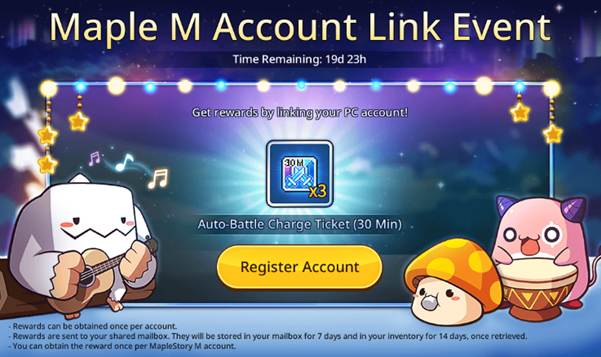
Event Rewards
| Item | Duration | |
|
| Auto-Battle Charge Ticket (30 Min) x3 | 14 days |

* Reward items can be moved or stored in Storage but cannot be listed at the Trade Station.
Important Notes
- You can only participate in this event once per account.
- Accounts that were already linked can receive rewards immediately.
- Once you claimed your reward, you will not be able to claim it again even if you unlink and link your accounts again.
- The event page will disappear after you claim your reward.
2. Challenge! Summer Growth Special Training!
Special growth training prepared just in time for summer!
Choose the mission you want and overcome the challenge to receive various rewards!
Event Period
2026/7/10 (Fri) 00:00 – 2026/7/29 (Wed) 09:59 (Server Time)
* Server Time Standards: America UTC-8 | Europe UTC+2 | Asia 1&2 UTC+8
Event Details
Choose the mission you want to challenge every day! If you complete the mission, you can receive rewards helpful for growth and get the Summer Special Training Mark. Collect Summer Special Training Marks to receive a special reward.
[How to Participate in the Event]
① You can enter the event through [Event] > [Challenge! Summer Growth Special Training!].
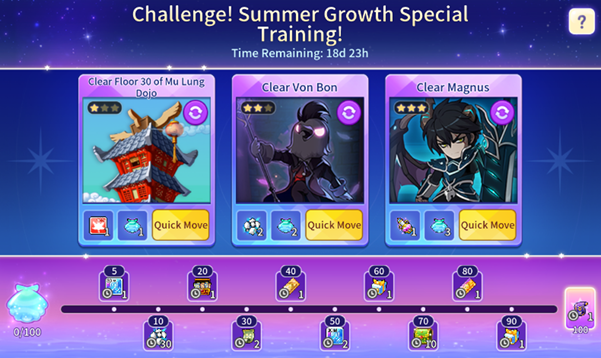
② If no mission is selected from the event, a mission select pop-up will be displayed automatically.
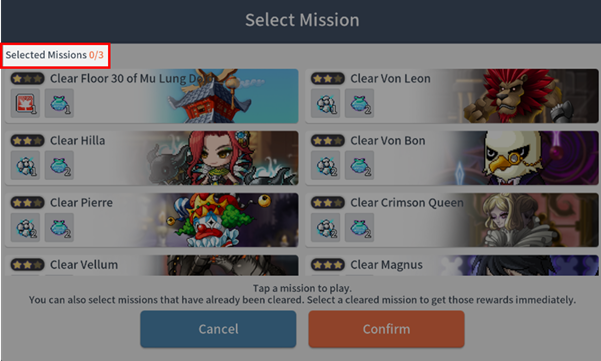
* The number of selected missions and the number of selectable missions can be checked at the top left of the pop-up.
③ You can select up to 3 missions to clear per day. The mission types are as follows.
| Mission Rank | Mission Type |
| ★ | Clear Floor 30 of Mu Lung Dojo |
| ★★ | Clear Von Leon |
| Clear Hilla | |
| Clear Root Abyss (Von Bon, Pierre, Crimson Queen, Vellum) | |
| ★★★ | Clear Magnus |
| Clear Arkarium | |
| Clear Floor 39 of Mu Lung Dojo |
* All missions will be complete upon clearing regardless of difficulty and single-player/multi-player mode.
④ The mission selected from the mission select pop-up will be placed in the mission slot.
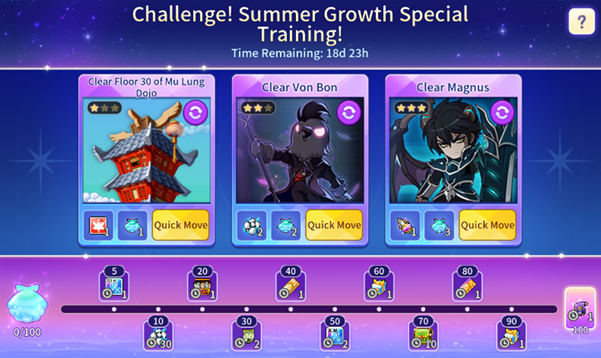
* You can only obtain the rewards of the placed mission. The placed mission will remain until you change it directly.
⑤ If you wish to change the mission, you can tap the mission slot image area to do so.
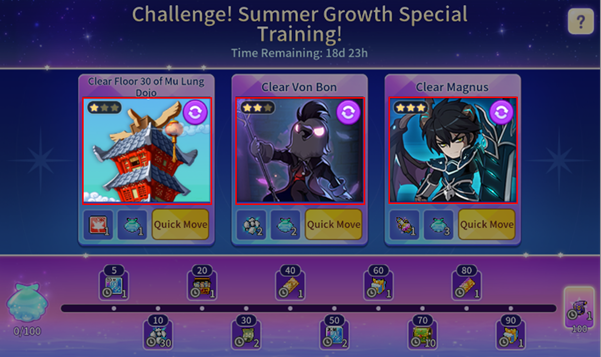
* If you cleared the placed mission, the slot cannot be changed to a different mission.
⑥ You can check cleared missions from the mission select pop-up.
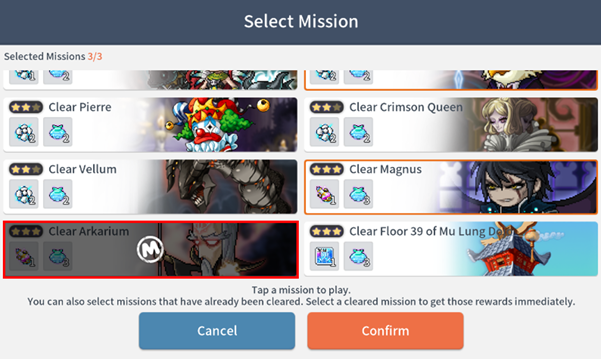
* You can claim rewards immediately by selecting a cleared mission or changing and placing it in the mission slot.
Event Rewards
This event is account-based and provides item rewards and Summer Special Training Marks depending on the mission rank upon clearing a mission.
[Mission Rewards]
| Mission Rank | Mission Type | Reward | Amount | Number of Summer Special Training Marks | |
| ★ | Clear Floor 30 of Mu Lung Dojo |
| Red EXP Increase Ticket | 1 | 1 |
| ★★ | Clear Von Leon |
| Nodestone | 1 | 2 |
| Clear Hilla | 2 | ||||
| Clear Root Abyss (Von Bon, Pierre, Crimson Queen, Vellum) |
| Nodestone | 2 | 2 | |
| ★★★ | Clear Magnus |
| Storm Growth Elixir | 1 | 3 |
| Clear Arkarium | 3 | ||||
| Clear Floor 39 of Mu Lung Dojo |
| Auto-Battle Charge Ticket (30 Min) | 1 | 3 | |


* Rewards will be stored in your shared mailbox for 7 days.
[Cumulative Rewards]
You can earn cumulative rewards based on how many Summer Special Training Marks you have.
| Required Amount | Reward | Amount | Item Duration | |
| 5 |
| Auto-Battle Charge Ticket (30 Min) | 1 | 14 |
| 10 |
| Nodestone | 30 | 30 |
| 20 |
| Enhancement Scroll Box | 1 | 14 |
|
| (Component) Shielding Ward | 2 | 14 | |
|
| (Component) Shield Scroll | 2 | 14 | |
| 30 |
| Lucky Day Scroll (5%) | 2 | 14 |
| 40 |
| Forge Meso Reward Points Card (50,000,000) | 1 | 14 |
| 50 |
| Auto-Battle Charge Ticket (30 Min) | 2 | 14 |
| 60 |
| Summer Special Training Choice Box | 1 | 30 |
|
| (Component) Ancient Weapon Crystal Piece | 30 | Permanent | |
|
| (Component) Ancient Armor Crystal Piece | 30 | Permanent | |
|
| (Component) Chaos Crystal Piece | 20 | Permanent | |
| 70 |
| Legendary Rank Up Stone Choice Box | 10 | 30 |
|
| (Component) Weapon Rank Up Stone (Legendary) | 1 | 30 | |
|
| (Component) Armor Rank Up Stone (Legendary) | 1 | 30 | |
| 80 |
| Meso Boost Reward Points Card (50,000,000) | 1 | 14 |
| 90 |
| Summer Special Training Choice Box | 1 | 30 |
|
| (Component) Ancient Weapon Crystal Piece | 30 | Permanent | |
|
| (Component) Ancient Armor Crystal Piece | 30 | Permanent | |
|
| (Component) Chaos Crystal Piece | 20 | Permanent | |
| 100 |
| Exalt Fail Count Reduction Scroll (50%) | 1 | 30 |


* Rewards can be claimed once per account and will be stored in your shared mailbox for 7 days.
Important Notes
- This event is an account-based event.
3. Pink Bean Slides and Ladders Event
Pink Bean heads to the pyramids of the scorching desert!
Roll the dice to complete the Slides and Ladders board and earn reward items.
Event Period: 2026/07/09 After Update – 2026/07/23 (Thu) 09:59 (Server Time)
* Server Time Standards: America UTC-8 | Europe UTC+2 | Asia 1&2 UTC+8
Event Details
Hunt every day to get Dice x10, and you can play 5 more times using Mesos.
If you complete the board, you'll get additional rewards based on the number of completions.
[How to Participate in the Event]
① You can participate in the event by going to [Menu] > [Event] > [Pink Bean Slides and Ladders].
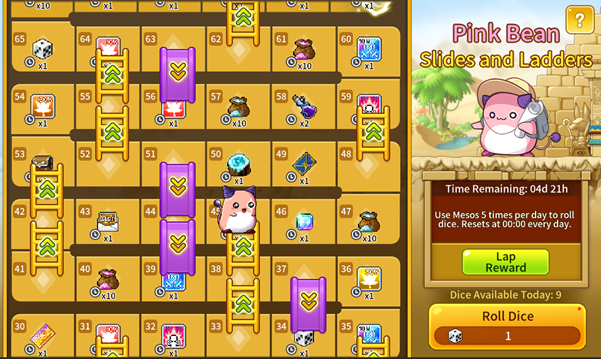
② You can get dice by defeating monsters, and you can use the event dice you got to roll them.
* There are no level restrictions for participating in this event.
③ Roll the dice, and Pink Bean moves the number of spaces shown. If Pink Bean lands on a ladder, it moves upward. If Pink Bean lands on a slide, it moves down. If Pink Bean lands on a space with a reward, it receives that reward.
④ You can also earn additional completion rewards based on the number of times you complete the Slides and Ladders board.
Event Rewards
Please check in-game for details on board game rewards.
[Completion Rewards]
| Completion Count | Item | Duration | |
| 1 | Auto-Battle Charge Ticket (30 Min) x2 |
| 14 days |
| 2 | Shield Box x1 |
| 14 days |
| (Component) Shielding Ward x1 |
| 14 days | |
| (Component) Shield Scroll x1 |
| 14 days | |
| 3 | Lucky Day Scroll 7% x1 |
| 14 days |
| 4 | Exalt Fail Count Reduction Scroll (50%) x1 |
| 30 days |
| Repeated after the 5th time | Growth Ladder Box x1 |
| 14 days |
| (Component) Auto-Battle Charge Ticket (1 Hr) x1 |
| 14 days | |
| (Component) Orange EXP Increase Ticket x2 |
| 14 days | |


* Reward items can be moved or stored in Storage but cannot be listed at the Trade Station.
* All event rewards are delivered to your shared mailbox and stored for 7 days.
Important Notes
- This event is an account-based event.
[Crystal Shop]
Crystal Treasure Box: Secondary Weapon x3 Event!
Discover a treasure box with triple the chance to obtain Secondary Weapons! 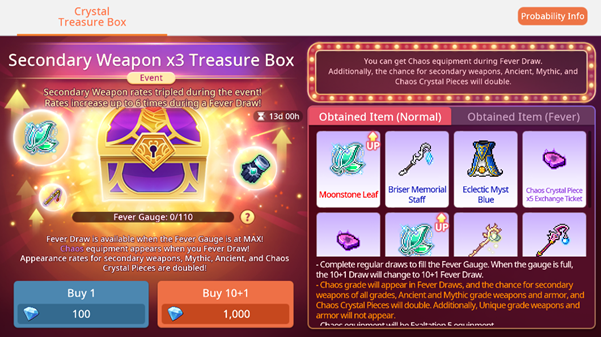
▶Event Period: 2026.07.09 After the update ~ 2026.07.15 09:59 (Server Time)
*Server Time: America = UTC-8 / Europe = UTC+2 / Asia 1&2 = UTC+8
The chance event applies when drawing from the Crystal Treasure Box on the [Shop] – [Crystal Treasure Box] page.
▶Event Details
- The chance to obtain Unique/Legendary/Mythic secondary weapons increase by 3 times when drawing from the Crystal Treasure Box.
- When Fever Draw is activated, the x2 Fever rate is applied on top of the event’s x3 secondary-weapon rate boost.
*Detailed rates can be viewed on the probability info page.
[New Packages]
[Event Packages]
Treasure Box Special Ticket Package
▶Sales Period: 2026.07.09 After the update – 2026.07.14 09:59 (Server Time)
*Server Time: America = UTC-8 / Europe = UTC+2 / Asia 1&2 = UTC+8
▶Package Details
| Package Name | Purchase Limit | Package Name | |
| Treasure Box Special Ticket Package | X5 per account |
| Crystal Treasure Box Ticket x160 |
|
| [Get Sunshine Points!] Sunshine Point x16,000 | ||


*Crystal Treasure Box Tickets can be used in place of Crystals to purchase Crystal Treasure Boxes. (10 tickets are required for a 10+1 draw)
*Purchased items will be delivered to your shared mailbox and must be claimed within 1 day.
*All items, except for Crystals, will expire after 14 days.
*All items can be stored and transferred via Storage but cannot be listed on the Trade Station.
Treasure Box Ticket Package
▶Sales Period: 2026.07.09 After the update – 2026.07.14 09:59 (Server Time)
*Server Time: America = UTC-8 / Europe = UTC+2 / Asia 1&2 = UTC+8
▶ Package Details
| Package Name | Purchase Limit | Package Name | |
| Treasure Box Ticket Package | X20 per account |
| Crystal Treasure Box Ticket x20 |
|
| Crystals x450 | ||
|
| [Get Sunshine Points!] Sunshine Points x2,000 | ||


*Crystal Treasure Box Tickets can be used in place of Crystals to purchase Crystal Treasure Boxes. (10 tickets are required for a 10+1 draw)
*Purchased items will be delivered to your shared mailbox and must be claimed within 1 day.
*All items, except for Crystals, will expire after 14 days.
*All items can be stored and transferred via Storage but cannot be listed on the Trade Station.
MAX Currency Package
▶Sales Period: 2026.07.09 After the update – 2026.07.16 09:59 (Server Time)
*Server Time: America = UTC-8 / Europe = UTC+2 / Asia 1&2 = UTC+8
▶Package Details
| Package Name | Purchase Limit | Details | |
| Max Currency Package+
| X2 per account |
| Crystals x1,000 |
|
| Forge Meso Reward Points Card (1,000,000,000) x1 | ||
|
| 2,000,000,000 Meso Exchange Ticket x2 | ||
|
| 1,000,000,000 Meso Exchange Ticket x1 | ||
|
| Auto-Battle Charge Ticket (30 Min) x10 | ||
|
| Sol Erda Fragment x10 | ||
|
| Sol Erda Energy (100 Charges) x5 | ||
| MAX Currency Package
| X2 per account |
| Crystals x500 |
|
| Forge Meso Reward Points Card (500,000,000) x1 | ||
|
| 1,000,000,000 Meso Exchange Ticket x2 | ||
|
| Auto-Battle Charge Ticket (30 Min) x5 | ||
|
| Sol Erda Fragment x5 | ||
|
| Sol Erda Energy (100 Charges) x2 | ||


*Purchased items will be delivered to your shared mailbox and must be claimed within 7 days.
*The Meso Mileage Card will expire after 60 days, while all other items will expire after 30 days.
*All items can be stored and transferred via Storage but cannot be listed on the Trade Station.
*Available for purchase only if you have at least one character level 250 or higher on your account.
[Auto-Battle Packages]
So Cool Summer Auto-Battle Package
▶Sales Period: 2026.07.09 After the update – 2026.07.23 09:59 (Server Time)
*Server Time: America = UTC-8 / Europe = UTC+2 / Asia 1&2 = UTC+8
▶Package Details
| Package Name | Purchase Limit | Details | |
| So Cool Summer | X6 per account |
| Auto-Battle Charge Ticket (30 Min) x110 |
|
| Purple EXP Increase Ticket Lv. 1 x40 | ||


*Purchased items will be delivered to your shared mailbox and must be claimed within 7 days.
*All items will expire after 30 days.
*All items can be stored and transferred via Storage but cannot be listed on the Trade Station.
[Crystal Packages]
Special Crystal Sale Package
▶Sales Period: 2026.07.09 After the update – 2026.07.16 09:59 (Server Time)
*Server Time: America = UTC-8 / Europe = UTC+2 / Asia 1&2 = UTC+8
▶Package Details
| Package Name | Purchase Limit | Details | |
| Special Crystal | X3 per account |
| Crystal x2,450 |
| Special Crystal | X3 per account |
| Crystal x800 |
| [All package purchase (6 times total) bonus]
| |||


*Purchased items will be delivered to your shared mailbox and must be claimed within 7 days.
Premium 10,000 Crystal Package
▶Sales Period: 2026.07.09 After the update – 2026.07.16 09:59 (Server Time)
*Server Time: America = UTC-8 / Europe = UTC+2 / Asia 1&2 = UTC+8
▶Package Details
| Package Name | Purchase Limit | Details | |
| Premium 10,000 Crystal Package | X10 per account |
| Crystals x10,000 |

*Purchased items will be delivered to your shared mailbox and must be claimed within 7 days.
Special Crystal Step Up Package
A Crystal Step-Up Package that comes with plenty of Crystals at every stage!
▶ Sales Period: 2026.07.09 After the update – 2026.07.16 23:59 (Server Time)
*Server Time: America = UTC-8 / Europe = UTC+2 / Asia 1&2 = UTC+8
▶Package Details
| Stage 1 | Stage 2 | Stage 3 | Stage 4 |
|
|
|
|
|
| 450 | 1,000 | 2,050 | 5,500 |
| Acquire 9,000 Crystals in total! | |||


*The Crystal Step Up Package can be purchased once per account.
*Packages must be purchased in sequential order, starting from Stage 1.
*For example, you must purchase the Stage 1 Package before you can purchase the Stage 2 Package.
*Purchased items will be delivered to your shared mailbox and must be claimed within 14 days.
[Enhancement Packages]
Perfect Exalt Fail Count Reduction Scroll Package
A package that 100% guarantees an Exalt Fail Count reduction!
▶Sales Period: 2026.07.09 After the update – 2026.07.29 09:59 (server time)
*Server Time: America = UTC-8 / Europe = UTC+2 / Asia 1&2 = UTC+8
▶Package Details:
| Package Name | Purchase Limit | Details | |
| Perfect Exalt Fail Count | Unlimited |
| Exalt Fail Count |
|
| Crystals x2,000 | ||


*Purchased items will be delivered to your shared mailbox and must be claimed within 7 days.
*All items, except for Crystals, will expire after 30 days.
*All items can be stored and transferred via Storage but cannot be listed on the Trade Station.
Lite Radiant Exaltation Package
▶Sales Period: 2026.07.09 After the update – 2026.07.23 09:59 (Server Time)
*Server Time: America = UTC-8 / Europe = UTC+2 / Asia 1&2 = UTC+8
▶Package Details
| Package Name | Purchase Limit | Details | |
| Lite Radiant Exaltation | X5 per account |
| Radiant Exaltation Stone (50%) x1 |
|
| Crystals x300 | ||


*Purchased items will be delivered to your shared mailbox and must be claimed within 7 days.
*All items can be stored and transferred via Storage but cannot be listed on the Trade Station.
*The Radiant Exaltation Stone (50%) is permanent.
*Available for purchase only if you have at least one character level 200 or higher on your account.
Chaos Mastercraft Package
▶Sales Period: 2026.07.09 After the update – 2026.07.23 09:59 (Server Time)
*Server Time: America = UTC-8 / Europe = UTC+2 / Asia 1&2 = UTC+8
▶Package Details
| Package Name | Purchase Limit | Details | |
| Chaos Mastercraft Package 1 | X3 per account |
| Lucky Chaos Mastercraft Scroll (10%) x1 |
|
| Crystals x1050 | ||
| Chaos Mastercraft Package 2 | X3 per account |
| Mastercraft Failure Count Reduction Scroll (Chaos) x2 |
|
| Crystals x1050 | ||


*Purchased items will be delivered to your shared mailbox and must be claimed within 7 days.
*All items can be stored and transferred via Storage but cannot be listed on the Trade Station.
*All items, except for Crystals, will expire after 90 days.
*Available for purchase only if you have at least one character level 200 or higher on your account.
Chaos Exaltation Support Package
▶Sales Period: 2026.07.09 After the update – 2026.07.16 09:59 (server time)
*Server Time: America = UTC-8 / Europe = UTC+2 / Asia 1&2 = UTC+8
▶Package Details:
| Package Name | Purchase Limit | Details | |
| Plus Chaos Exaltation Fragment Package | X15 per account |
| Chaos Exaltation Fragment (25%) x1 |
|
| Crystals x500 | ||
|
| [Bonus for every 3 purchases] Chaos Exaltation Fragment (25%) x1 | ||
| Lucky Chaos Exaltation Stone (15%) Package | X5 per account |
| Lucky Chaos Exaltation Stone (15%) x1 |
|
| Crystals x500 | ||


*Purchased items will be delivered to your shared mailbox and must be claimed within 7 days.
Chaos Exaltation Fragment (25%) can be used as a material when crafting Chaos Exaltation Stones in Alchemy.
*Lucky Chaos Exaltation Stone (15%) is a 60-day item, and all other items are permanent.
*All items can be stored and transferred via Storage but cannot be listed on the Trade Station.
Perfect Emblem Support Package
A package that allows you to add or change an Emblem with a 100% success rate!
▶Sales Period: 2026.07.09 After the update – 2026.07.16 09:59 (Server Time)
*Server Time: America = UTC-8 / Europe = UTC+2 / Asia 1&2 = UTC+8
▶Package Details:
| Package Name | Purchase Limit | Details | |
| Perfect Emblem Potential Package | X5 per account |
| Emblem Potential Scroll (100%) x1 |
|
| Emblem Trace x2 | ||
| Perfect Emblem Change Package | X10 per account |
| Premium Equipment Emblem Change Scroll (100%) x1 |


*Purchased items will be delivered to your shared mailbox and must be claimed within 7 days.
*All items will expire after 30 days.
*All items can be stored and transferred via Storage but cannot be listed on the Trade Station.
2+1 Exaltation Stone Package
▶Sales Period: 2026.07.09 After the update – 2026.07.23 09:59 (Server Time)
*Server Time: America = UTC-8 / Europe = UTC+2 / Asia 1&2 = UTC+8
▶Package Details
| Package Name | Purchase Limit | Details | |
| 2+1 | X10 per account |
| Exaltation Stone (50%) x2 |
|
| [Bonus for every purchase] | ||


*An Exaltation Stone (50%) can be used for Exaltation Levels 1 to 5 and has a 50% success rate.
*Purchased items will be delivered to your shared mailbox and must be claimed within 7 days.
*All items will expire after 30 days.
*All items can be stored and transferred via Storage but cannot be listed on the Trade Station.
Custom Package
A custom package that lets you choose exactly the items you want and need!
▶Sales Period: 2026.07.09 After the update – 2026.07.23 09:59 (Server Time)
*Server Time: America = UTC-8 / Europe = UTC+2 / Asia 1&2 = UTC+8
▶How to Use: You can choose and purchase bonus items within the points allocated to each Custom Package. Click the [Select] button to open the bonus item selection window, and once you have chosen items that meet the maximum point requirement, you will be able to purchase the package. Please note that the same item cannot be selected more than once.
▶Package Details
| Package Name | Purchase Limit | Details | Points | |
| Custom Package 1 (30 pts. Available) | Unlimited |
| Crystals x1,050 | - |
|
| Rebirth Flame (Mythic) x6 | 20 | ||
|
| Lucky Chaos | 20 | ||
|
| Secondary Weapon Emblem Change Scroll (100%) x3 | 20 | ||
|
| Lucky Day Scroll (10%) x9 | 10 | ||
|
| Black Cube x50 | 10 | ||
|
| Shield Scroll x7 | 5 | ||
|
| Shielding Ward x7 | 5 | ||
| Custom Package 2 (20 pts. Available) | Unlimited |
| Crystals x500 | - |
|
| Secondary Weapon Emblem Shard x1,200 | 20 | ||
|
| Secondary Weapon Emblem Potential Scroll (100%) x1 | 20 | ||
|
| Basic Bonus Potential Stamp x1 | 20 | ||
|
| Equipment Style Change Permit x1 | 15 | ||
|
| Equipment Option Choice Reset Scroll x1 | 15 | ||
|
| Bonus Potential Scroll (70%) x1 | 15 | ||
|
| Auto-Battle Charge Ticket (30 Min) x10 | 5 | ||
|
| Snake Soup x5 | 5 | ||


*Tap and hold the item icon to view its name and description.
*Purchased items will be delivered to your shared mailbox and must be claimed within 7 days.
*All items, except for Crystals, will expire after 14 days.
*All items can be stored and transferred via Storage but cannot be listed on the Trade Station.
Lucky Ancient Mastercraft Custom Package
▶Sales Period: 2026.07.09 After the update – 2026.07.23 09:59 (Server Time)
*Server Time: America = UTC-8 / Europe = UTC+2 / Asia 1&2 = UTC+8
▶How to Use: You can select and purchase bonus items within the points given to each type of Custom Package. First, choose the bonus items through the [Select] button. Once you select the items meeting the maximum point requirements, you will be able to purchase the package. However, the same item cannot be selected twice.
▶Package Details
| Package Name | Purchase Limit | Details | Points | |
| Lucky Ancient Mastercraft (30 pts. Available) | Unlimited |
| Crystals x200 | - |
|
| Lucky Ancient | 20 | ||
|
| Ancient Weapon Crystals x1 | 20 | ||
|
| Ancient Armor Crystals x1 | 20 | ||
|
| Ancient Crystal Piece | 10 | ||
|
| Mastercraft Failure Count | 10 | ||
|
| Lucky Ancient | 10 | ||
|
| Ancient Crystal Piece | 5 | ||
|
| Daily Dungeon Chaos Mode | 5 | ||


*Available for purchase only if you have at least one character level 140 or higher on your account.
*Tap and hold the item icon to view its name and description.
*Purchased items will be delivered to your shared mailbox and must be claimed within 7 days.
*All items, except for Crystals, will expire after 30 days.
*All items can be stored and transferred via Storage but cannot be listed on the Trade Station.
*Items obtained from the [Ancient Crystal Piece Choice Box] are permanent and cannot be stored in Storage, transferred, or traded in the Trade Station.
PLUS Legendary Rank Up Stone Package
▶Sales Period: 2026.07.09 After the update – 2026.07.29 09:59 (Server Time)
*Server Time: America = UTC-8 / Europe = UTC+2 / Asia 1&2 = UTC+8
▶Package Details
| Package Name | Purchase Limit | Details | |
| Plus Legendary Weapon | X10 per account |
| Weapon Rank Up Stone |
|
| 20,000,000 Meso Exchange Ticket x1 | ||
| Plus Legendary Armor | X10 per account |
| Armor Rank Up Stone (Legendary) x3 |
|
| 20,000,000 Meso Exchange Ticket x1 | ||


*Purchased items will be delivered to your shared mailbox and must be claimed within 14 days.
*All items can be stored and transferred via Storage but cannot be listed on the Trade Station.
*The Meso Exchange Ticket will expire after 30 days.
*The Rank Up Stone is permanent.
[Growth Packages]
Extreme/High Level Up Buff Package
▶Sales Period (Server Time):
- 2026.07.09 After the update – 2026.07.12 23:59
- 2026.07.17 00:00 – 2026.07.19 23:59
- 2026.07.24 00:00 – 2026.07.26 23:59
*Server Time: America = UTC-8 / Europe = UTC+2 / Asia 1&2 = UTC+8
▶Package Details
| Package Name | Purchase Limit | Components | |
| Extreme Level Up Buff Package | X3 per account |
| 300% EXP Buff (24 Hr) |
| High Level Up Buff Package | X3 per account |
| 30% EXP Buff (24 Hr) |


*Both packages can be purchased at the same time.
*Upon purchase, a 300% or 30% EXP Increase buff will be applied immediately and will last for 24 hours. This buff cannot be removed while active.
*The buff effect applies to all characters within the account.
*The buff can be stacked with other EXP Increase effects, including the Extreme Buff Package, but the total effect cannot exceed 400%.
[Other Improvements and Bug Fixes]
Other Improvements
1. The Forge Meso Reward Points Card has been improved so that it can also be used at Emblem Enhancement and Mastercraft.
2. Forge Alchemy: Improvements were made so that, for certain items that only allow 1 material to be registered, the UI remains consistent before and after a material is added.
3. When you choose to download game data by selecting the option to start the game while it downloads, the download can now continue in the background.
4. The [Style Shop] was intended to sell only style items that cannot be traded at the Trade Station, but there were some items that could be traded at the Trade Station, so they have been excluded from the selection. (Palm Print Mask)
5. An improvement has been made so that a notification message appears when extracting a Longinus Spear Emblem.
6. Improved so that "Mysterious Energy" drops when the Black Mage is defeated, even without having accepted the "Path of the Adversary" quest.
7. (Thailand Only) A feature to start the game while downloading has been added.
8. Some mission details in the 7-Day Mission of the [Beginner Hero Orientation] event, held for new players, have been changed. (Mission progress will be retained.)
9. Fixed an issue with the operation of the Cannoneer skill 'Cannon of Mass Destruction' and improved its activation handling, so that the maximum number of activations has been increased to 22. (based on max level)
10. Improved so that when entering the Kerning M Tower, not only the party leader but also the other party members in the attack unit start with all charge-type skills fully charged.
Bug Fixes
1. Fixed an issue where characters could not be deleted from a Guest account on iOS devices.
2. Fixed an issue where a character assigned for <Miyo's Boost Mission> could not be deleted.
3. Fixed an issue where characters could not be deleted when having more characters than the maximum number of Character Slots.
4. Fixed an issue where equipment with an Emblem applied was selected when using the Inventory [Extract] filter feature.
5. Fixed an issue where the additional DEF Ignore and Damage Reflect Ignore were not applied to the final hit of the Dark Knight's "Darkness Aura" skill.
6. Fixed an issue where the "True Spirit Claw" and "Smashing Multipunch" skill icons in Shade's HEXA Matrix were displayed with their pre-remaster images.
7. Fixed an issue where the Fury value was not displayed during Demon Avenger's "Revenant" buff.
8. Fixed an issue where the Damage Dealt upon Expiration was applied abnormally after Demon Avenger's "Revenant" buff expired.
9. Fixed an issue where the completion reward page was reset to page 1 upon entering the Sunshine Reward Points Event page.
10. Fixed an issue where the Skill Quick Slot page-change key could not be set when a Bluetooth keyboard was connected on a mobile device.
11. Fixed an issue where, after clearing a boss and tapping the "Go to Menu" button, the menu would close when going back from Boss UI.
12. Fixed an issue where an extra cannonball was fired when using the Cannoneer skill 'Cannon of Mass Destruction' with the down directional key.
13. Fixed an issue where the description of the Cannoneer skill 'Monkey Business' did not indicate that it cannot be used during Auto-Battle.
14. Fixed an issue where the V Boost Node enhancement effect was not applied to the Blaster skill 'Hyper Magnum Punch'.
15. Fixed an issue where, during Phase 2 of the boss 'Lucid', the bullet pattern would intermittently fail to proceed and Lucid would become unable to move.
16. Fixed an issue where the V Boost Node indicator did not appear on the skill icon of the Bow Master skill 'Arrow Blow'.
17. Fixed an issue where Hayato did not gain Sword Energy when using the additional activation of 'Jin Quick Draw' while another skill was being cast.
18. Fixed an issue where the skill effect of the Blaster skill 'Revolving Blast' was displayed abnormally.
19. Fixed an issue where the description of the Cannoneer skill 'Buckshot' did not display detailed information about its stat increase values.
20. Fixed an issue where monsters were not knocked back by the Cannoneer skill 'Cannon Strike'.
21. Fixed an issue where a character silhouette was displayed in slots exceeding the maximum slot count on the character selection screen.
22. Fixed an issue where some UI elements appeared shaded and were not visible when moving between maps through an NPC.
23. Fixed an issue where skill key inputs were intermittently not registered during boss content.
24. Fixed an issue where the Kain Secondary Weapon was not displayed when previewing the Secondary Weapon Box in the Gold Leaf Shop.
More from this series
This Upcoming Updates entry belongs to MapleStory M. Related pages below keep this series separate from other MapleStory games.
Source and verification
MPStorys shows the readable on-site body above. The source page remains attached only as a citation and update trail.
MapleStory M Official News