 MapleStory NGLB
[Community] Chat Window

Summary
“[Community] Chat Window” is an official guide from MapleStory N Official Beginner's Guides on 2024-11-05. Its canonical Nexon thread and publication metadata are retained for source-backed verification.
Article body
Chat Window
Table of Contents
-
How to Use Chat Window
-
Filter and Tab Settings
1. How to Use Chat Window
Chat Window is located in the bottom left of the game screen.
Press the enter key to input a message into the chat. You can move Chat Window to any location within the game screen by clicking on the upper left corner of Chat Window.
1.1. Popping Out Chat Window
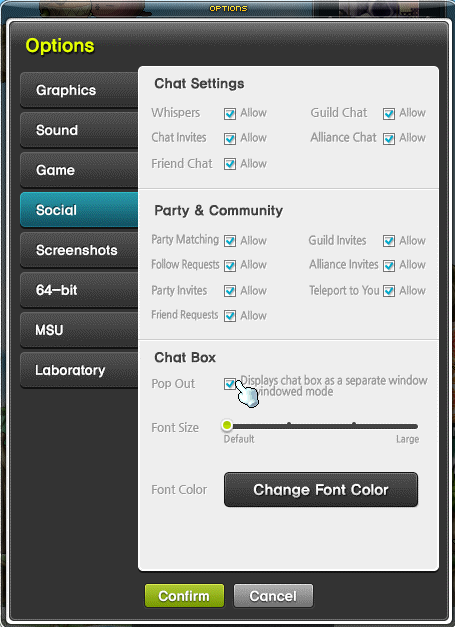
You can pop Chat Window out of the game string while playing in windowed mode.
-
[Settings – Options – Chat & Invitations – Display chat window outside the game window.]
-
Click the [Display chat window outside the game window] icon at the bottom right of Chat Window.
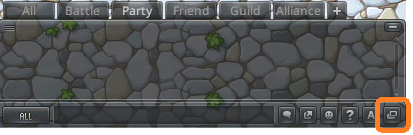
Use the Help button [?] to view a list of "/commands" that can be used in Chat Window.
2. Filter and Tab Settings
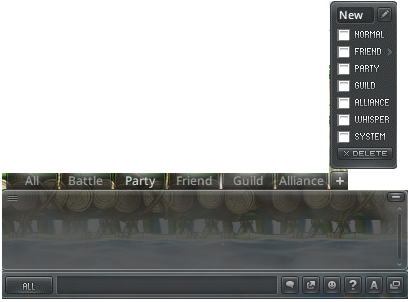
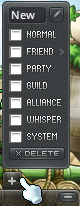
Right-click on Chat Window tab to customize tab names, change the applied filters, delete tabs, or manage other settings.
-
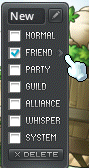
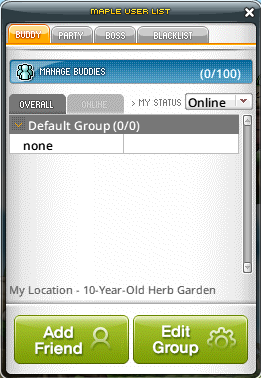
You can save and manage the Friends filter by selecting groups in your Friends menu (shortcut key [R]).
-
Click the [+] button to set up and add custom tabs.
More from this series
This Guides entry belongs to MapleStory N. Related pages below keep this series separate from other MapleStory games.
Source and verification
MPStorys shows the readable on-site body above. The source page remains attached only as a citation and update trail.
MapleStory N Official Beginner's Guides