 MapleStory NGLB
[Community] Friends

Summary
“[Community] Friends” is an official guide from MapleStory N Official Beginner's Guides on 2024-11-20. Its canonical Nexon thread and publication metadata are retained for source-backed verification.
Article body
Friends
Table of Contents
-
Friends Window
-
Adding Friends
-
Managing Friends
1. Friends Window
| Character Friend | Account Friend |
|
|
|
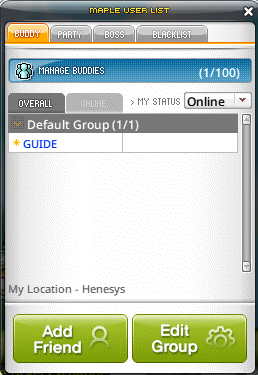
The Friends Window is a UI where you can review the list of friends you have in the game. Tap the in-game hotkey (R) to see the basic friends window and review the list of friends you've added.
You can set up friend groups and change the name of the group to whatever you'd like.
2. Adding Friends
-
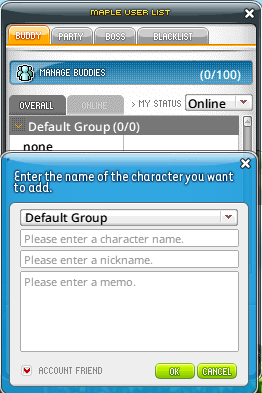
Right-click on a character and click Add Friend to send a friend request to another character.
-
You can send friend requests to characters in the same world by tapping the hotkey (R) and selecting Add Friend in the party window.
2.1. Account Friends
When you add a friend, you can choose whether or not to add that user as an Account Friend.
-
When you add someone as an Account Friend, you can check their connection information even if they log in with a different character on their account.
-
When you add someone as an Account Friend, you can give them a nickname so that, even if they login with a different character, they are easily recognizable.
3. Managing Friends
You can manage the friends you have in the Friends Window.
| Character Friend | Account Friend |
|
|
|
-
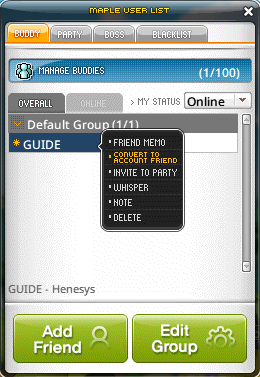
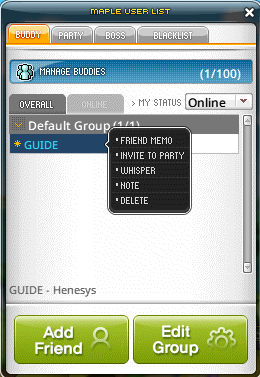
You can add and edit the groups that your friends belong to.
-
Right-click on a character name in your friends list to do things like write a friend memo, send a message, and delete that friend.
-
If your friends are online, you can invite them to a party or whisper to them.
-
If you do not want to receive whispers, friend chats, chat invitations, or party invitations from your friends, you can block them by unchecking them in the settings.
-
When you become friends, you'll see each other's login and level-up information in the chat window.
-
If you don't want your friends to see your login status and level-up information, you can switch to Invisible Login.
-
-
More from this series
This Guides entry belongs to MapleStory N. Related pages below keep this series separate from other MapleStory games.
Source and verification
MPStorys shows the readable on-site body above. The source page remains attached only as a citation and update trail.
MapleStory N Official Beginner's Guides