

摘要
“[Community] Messages” is an official guide from MapleStory N Official Beginner's Guides on 2024-11-20. Its canonical Nexon thread and publication metadata are retained for source-backed verification.
正文
Messages
Table of Contents
-
Sending Messages
-
Inbox
1. Sending Messages
The Message feature allows you to exchange messages with other players in the game.
After logging in, click on the Community menu at the bottom of the screen and then press the Message menu.
-
Click the Send button to send your message.
-
Messages can be up to 100 characters long.
1.1. Messaging Restrictions
Each character can send up to 3 messages a minute. If you send 3 messages within a minute, your 3-message limit will recharge 1 minute after the last message was sent.
Additionally, each character can send up to 20 messages.
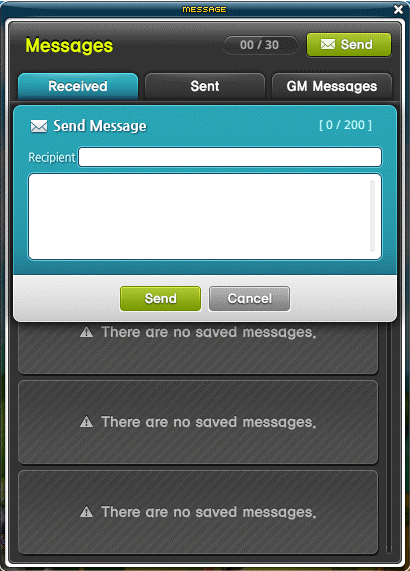
2. Inbox
2.1. Received
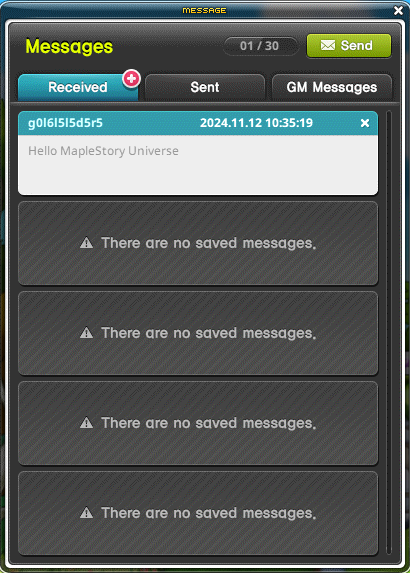
- Allows you to check messages sent by other characters.
- A + icon displays whenever you have an unread message, as shown in the image below.
- You can store up to 30 messages, excluding system messages such as invitations.
2.2. Sent
Allows you to check messages you sent to other characters.
2.3. GM Messages
Allows you to check messages sent by the administrator.
此系列的更多內容
這筆攻略內容僅屬於 MapleStory N。下方相關頁面也按此系列獨立整理,不會與其他 MapleStory 作品混用。
來源與核驗
上方已在本站顯示可閱讀正文;來源頁面只作為引用與後續更新核驗。
MapleStory N Official Beginner's Guides