

摘要
“[Community] Party” is an official guide from MapleStory N Official Beginner's Guides on 2024-11-20. Its canonical Nexon thread and publication metadata are retained for source-backed verification.
正文
Party
Table of Contents
-
Check Party Information
-
Invite to Party
-
Find Party
-
Accept Party
1. Check Party Information
You can check the default party window and party information by pressing the in-game hotkey [P].
-
You can view the HP of you and your party members by checking "Show HP" in the party window.
-
The party leader is marked with a ⭐, and party members are marked with a *.
2. Invite to Party
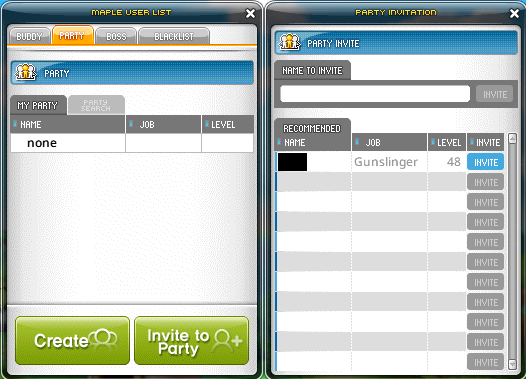
-
If you right-click on another character who is not in a party and click [Invite to Party], you can create your own party and invite them to it.
-
If you click [Invite to Party] in the party window, you can invite characters currently connected to the same world or receive recommendations for characters on the same map as party members.
-
When you become the party leader, you can give the party leader position to a party member using [Make Party Leader].
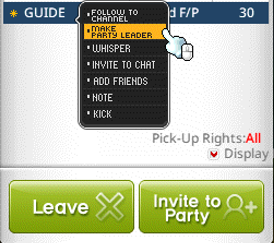
- The party leader can invite other characters to the party or kick party members.
3. Find Party
You can view the list of parties on the same map by clicking the [Find Party] button.
You can apply to join the party you want by clicking the [Apply] button.
4. Accept Party
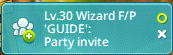
When you accept a party invitation from another character, you will join their party.
-
Each party can accommodate up to 6 party members.
-
If you do not want to be invited to parties, you can uncheck Party Matching in [Settings > Options > Social > Party & Community].
此系列的更多內容
這筆攻略內容僅屬於 MapleStory N。下方相關頁面也按此系列獨立整理,不會與其他 MapleStory 作品混用。
來源與核驗
上方已在本站顯示可閱讀正文;來源頁面只作為引用與後續更新核驗。
MapleStory N Official Beginner's Guides