 MapleStory WorldsGLB
How to Use the MapleStory Worlds API Reference

Summary
A detailed guide to the official MapleStory Worlds API Reference, including its eight reference families, entry format, execution-space badges, synchronization markers, API state badges, and log-message levels.
Article body
API Reference Guidelines
The API References of MapleStory Worlds provide information on various APIs and log messages needed to create a world.
Components
A functional unit added to an entity when creating a world. It has properties and functions.
Events
Occurs in various APIs of the world. It has properties and provides spatial information where events occur.
Services
Provides core features related to creating a system in the world. It has properties and functions.
Logics
The game logic needed to create the world. It has properties and functions.
Misc
Refers to a unique data type used only in the world. It has properties, creators, and functions.
Enums
A set of values that are linked together. It has properties, creators, and functions.
Lua
MapleStory Worlds use Lua 5.3by default. However, there may be minor differences from Lua 5.3. If you need more information, please refer to Lua's official website.
LogMessages
Log Messages are classified into three types according to the message type. The description of Error Messages is not the same as that of the Maker, but the former describes the circumstances under which the message occurs.
-
Info Level: Informational messages. It is indicated by the LIA prefix.
-
Warning Level: This message appears when the script is running but encounters a problem. The script may not have been implemented in the recommended format or it doesn't work as intended but may do something else. It is indicated by the LWA prefix.
-
Error Level: This message appears when the script cannot work normally or when no results can be obtained because the script does not operate as intended. It is indicated by the LEA prefix.
Introduction to the API Format
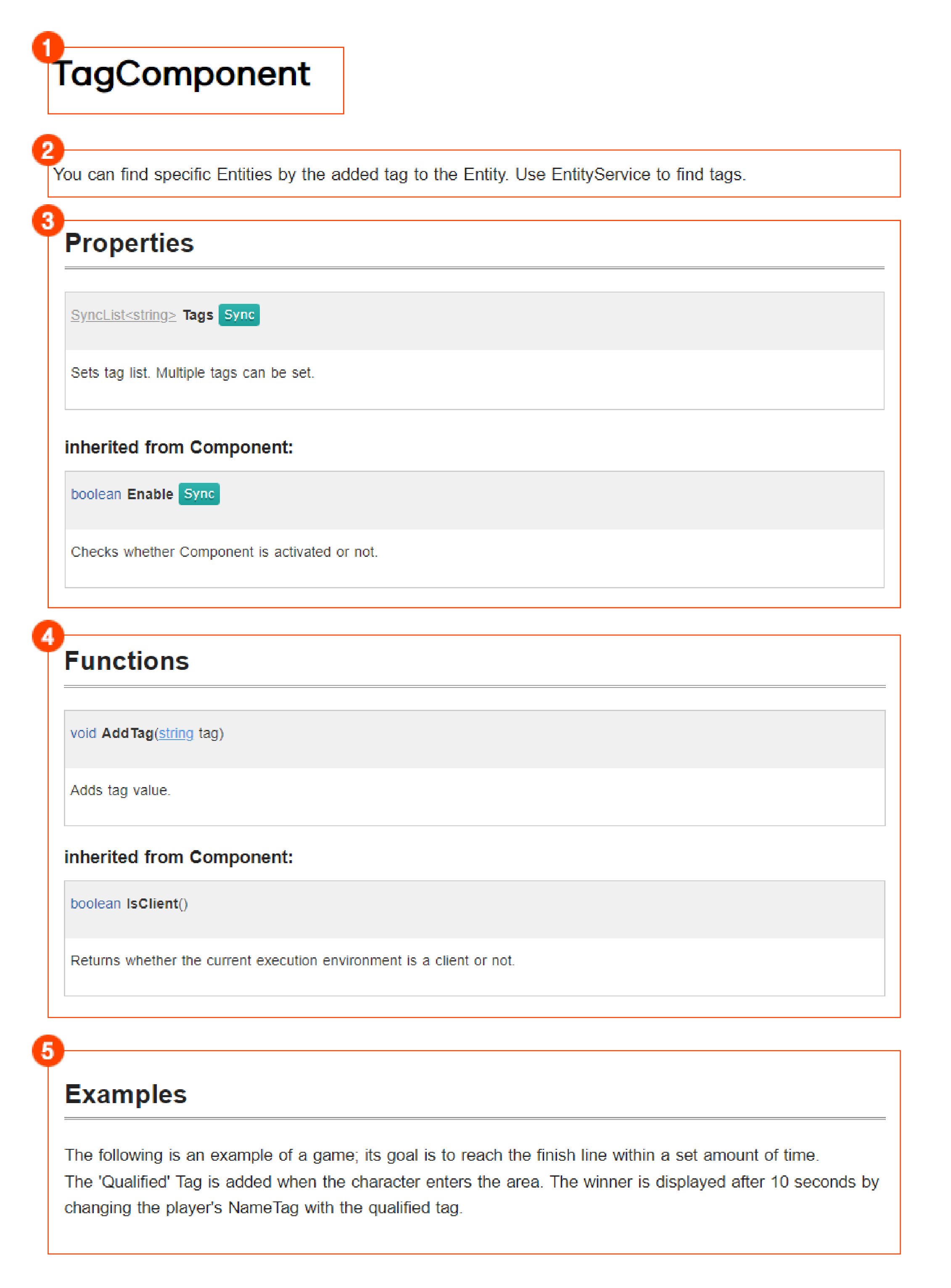
API References provide descriptions of the API at the top. Below the description will be properties, functions, and examples.
-
API Name: The name of the API.
-
API Description: Describes the overall characteristics of the API.
-
Properties: Explains the properties of the API. If it has inherited properties, they will be listed as inherited from 000.
-
Functions: Explains each function of the API. If it has inherited an API, they will be listed as inherited from 000.
-
Examples: Provides various example codes utilizing the API.
Configuration for Each API
Further descriptions for each API are as follows:

Type Name (Parameter Type Parameter Name)
-
Type: Indicates the return type required for the property, function, or event. If there is a document related to the return type, it will be linked here.
-
Name: The name of the property, function, or event of the API.
-
Parameter type: The specific type that a parameter uses. The parameter name must be written in a format suitable for the type.
-
Parameter name: Lists parameters required to use the API. Provides information on omissible parameters and variable parameters. This parameter can be omitted if the basic parameter and "=nil" are written together.
-
Notation example of omissible parameter name: CollisionGroup=nil
-
Notation example of variable parameter name: any... args
-
Badge Color
Synchronization information badge
-
: Usually refers to an API where values are synchronized from the server to the client.
Badge related to execution space control
-
: Refers to a read-only API whose value cannot be overwritten.
-
: An environment-only function with operation privileges. Can only be called in the environment.
-
: Can only be used in the Maker.
-
: Can only be used in the released World.
-
: A server-only function. (Can only be called on the server.)
-
: A client-only function. (Can only be called on the client.)
-
: A function executed on the server. Upon call from the client, this function is called on request to the server.
-
: A function executed on the client. Upon call from the server, the function is transferred to the clients and called.
Property-related badge
-
: Refers to a property not exposed on the Maker's property window. You can access this badge in the Script Editor.
Function-related badge
-
: Refers to the API whose script executions are suspended during the performance.
-
: Refers to a globally-accessible API.
Script-related badge
-
: Refers to a function that can be re-defined.
Type-related badge
-
: Refers to the abstracted API that cannot create any component on its own.
API state-related badge
-
: A deprecated API.
-
: An API pre-released to creators. It may be different from the API that will be officially released in the future.
API event-related badge
-
: Refers to the space where the event occurred. Events occur in the server.
-
: Refers to the space where the event occurred. Events occur in the client.
-
: Refers to the space where the event occurred. Events occur in the editor.
-
: Refers to the space where the event occurred. Events occur in the server and client.
More from this series
This Guides entry belongs to MapleStory Worlds. Related pages below keep this series separate from other MapleStory games.
Source and verification
MPStorys shows the readable on-site body above. The source page remains attached only as a citation and update trail.
MapleStory Worlds Creator Center API Reference