 MapleStory WorldsGLB
Localizing Dynamic Text Formats in MapleStory Worlds

Summary
An official implementation guide for dynamic localized strings using argument holes, GetTextFormat, SmartFormat, Korean postpositions, plural rules, and validation of malformed formats.
Article body
Localizing Formats


Course Introduction
When localizing, the text to be translated may contain mutable strings. Let's find out what functions you can use in this case and see how to use them through examples.
Before proceeding with this course, it is helpful to refer to the Understanding Localization guide.
Convert to Format
When localizing, the text to be translated may contain mutable strings depending on the World's environment.
For example, rather than simply translating "리나" to "Rina" in English, let's think about translating the sentence (format) of "Hello, {0}!". Let's assume {0} blank can contain multiple NPC names, such as "리나 (Rina)", "스탄 (Stan)", "알렉스 (Alex)". While "Hello, {0}!" has a specific format, filling its blanks with appropriate words depending on the situation to output a string could be called "Convert to Format".
A format has an (Argument hole). In the example sentence above, {0} is an Argument hole.

One string of the format may contain multiple Argument holes.
Use the GetTextFormat() or SmartFormat() function when converting to format. Let's take a closer look at how to use each function.
GetTextFormat
The GetTextFormat() function receives Key from LocalizationTable as an argument. It finds the text corresponding to this Key, and if there is an additionally delivered format argument (format argument), fills it in according to the format, and returns the result.
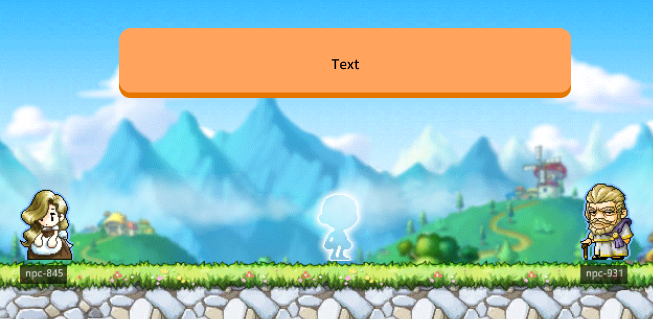
For example, as shown below, 2 NPCs are standing, and when the player character meets (collides) with each NPC, let's output the sentence "Hi, NPCName!" in the orange text box.
-
Place 2 NPCs on the map and modify the name of each NPC entity as below.
NPC Entity Name 
Stan 
Rina -
Add TriggerComponent to NPC Stan and Rina.
-
Add the text entity to ui - DefaultGroup in the UI Editor and rename it TextBox. Then set each property as below.
Property Value ImageRUID b9ab8455d5737bf4cb21433f00fdc19d Color 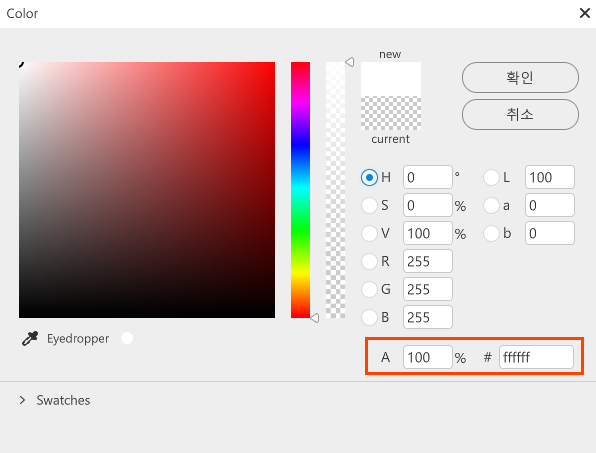
-
Create LocalizationTable and enter as follows.
ID Key Source ko en 1 UI_TEXT_NPC_Stan Stan 스탄 Stan 2 UI_TEXT_NPC_Rina Rina 리나 Rina 3 UI_TEXT_HELLO Hello, {0}! Hi, {0}! Hello, {0}! -
Generate a new script component LocalizationTest. Then, add the LocalizationTest component to Workspace - DefaultPlayer.
-
Add properties to LocalizationTest as follows.
Property: [None] Entity Stan = /maps/map01/Stan [None] Entity Rina = /maps/map01/Rina -
Add the
OnBeginPlay()function and compose its content as follows. Set the execution space to client only.[client only] void OnBeginPlay() { self.Stan.NameTagComponent.Name = _LocalizationService:GetText("UI_TEXT_NPC_Stan") self.Rina.NameTagComponent.Name = _LocalizationService:GetText("UI_TEXT_NPC_Rina") } -
Add TriggerEnterEvent to the event handler. Set the execution space to client only.
Then write the content as below.[client only][self] HandleTriggerEnterEvent(TriggerEnterEvent event) { -- Parameters local TriggerBodyEntity = event.TriggerBodyEntity -------------------------------------------------------- local npcName = TriggerBodyEntity.NameTagComponent.Name local translateText = _LocalizationService:GetTextFormat("UI_TEXT_HELLO", npcName) _EntityService:GetEntityByPath("/ui/DefaultGroup/TextBox").TextComponent.Text = translateText } -
Press the
 [Start] button and run a test.
Retrieves appropriate text according to the language setting of the client.
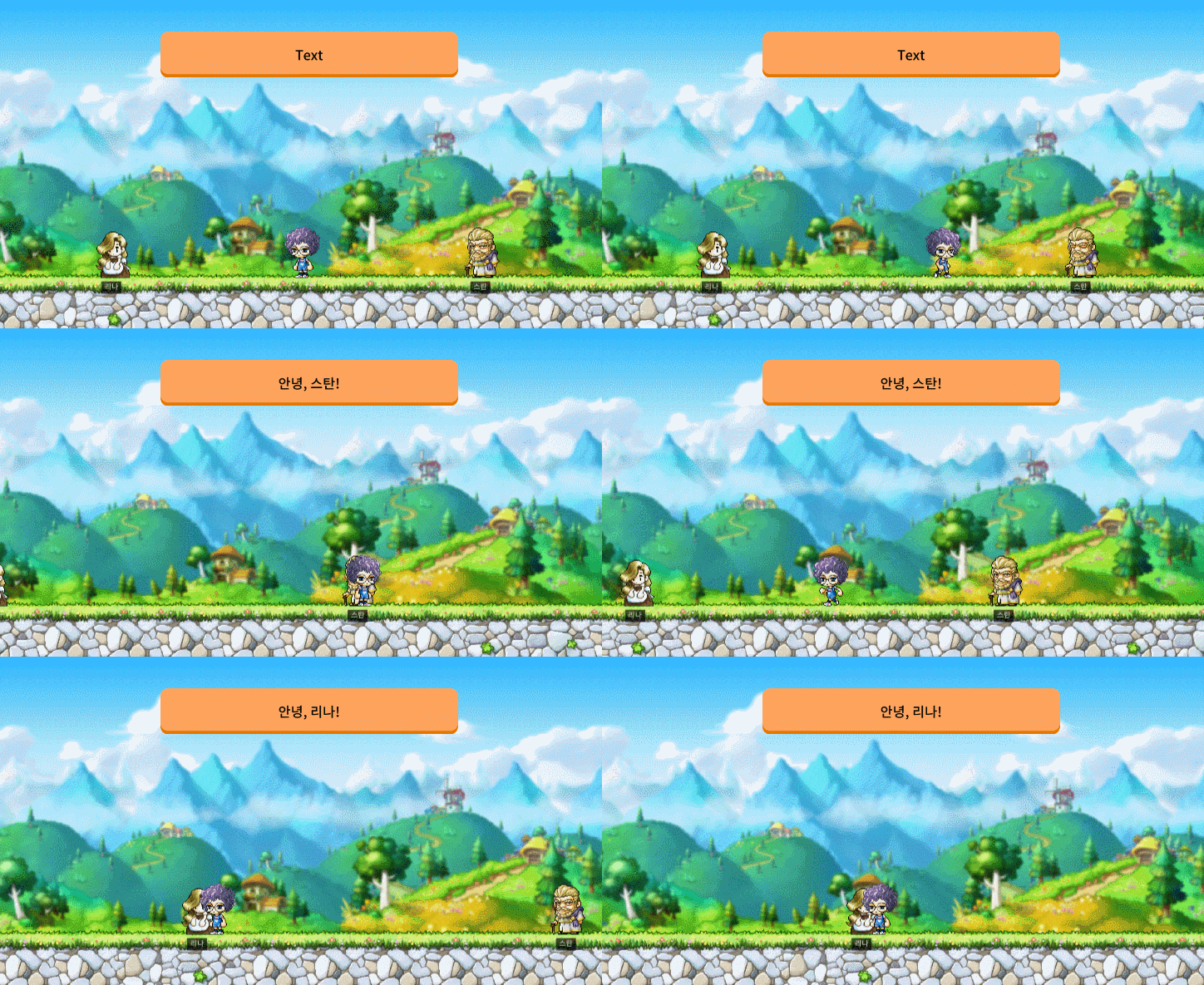
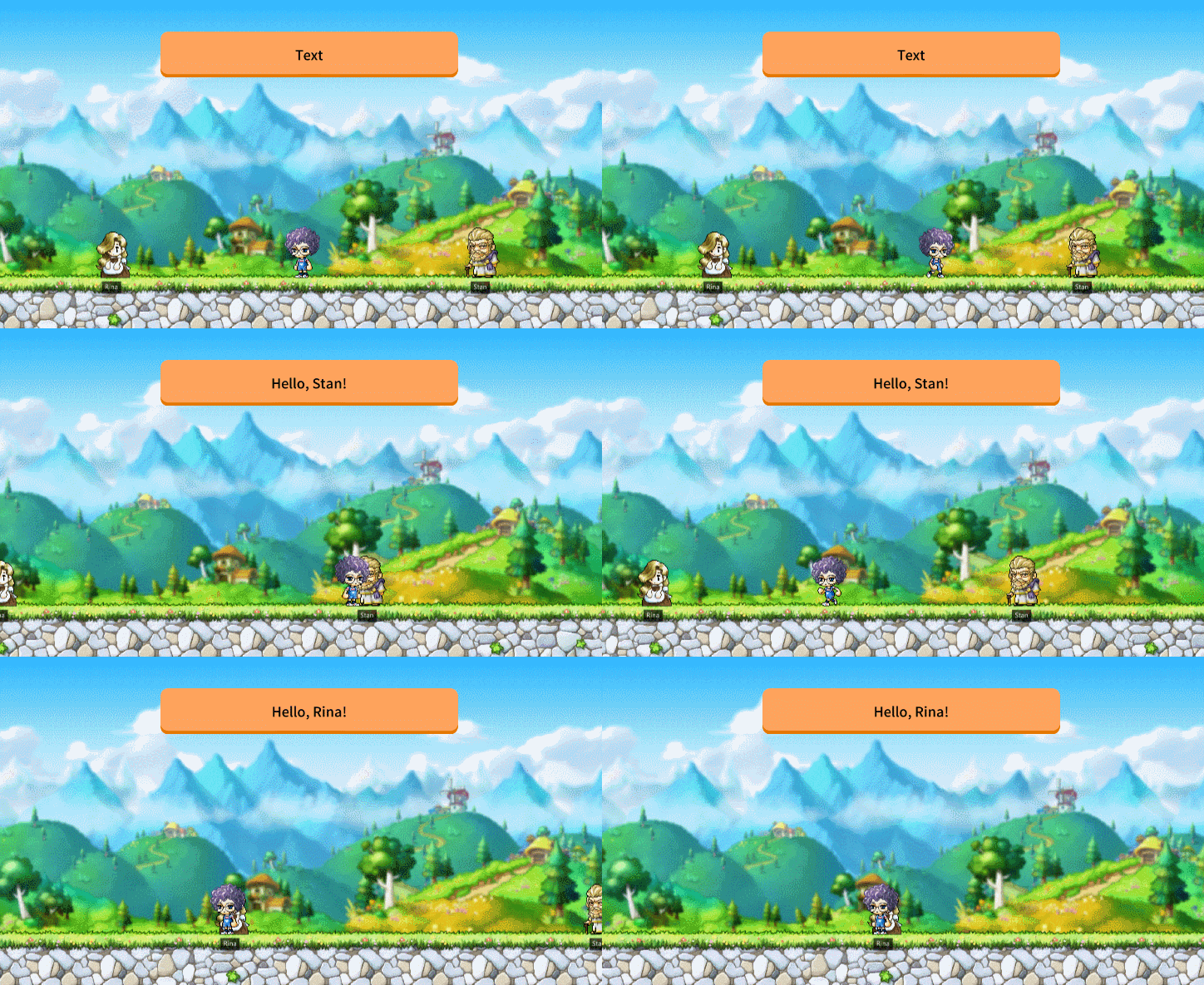
SmartFormat
GetText() or GetTextFormat() needs the translation table. If you want to use only the format function of GetTextFormat() without using the translation table, use the SmartFormat() function.
In SmartFormat(), instead of Key of LocalizationTable, the string to be output is directly received as an argument.
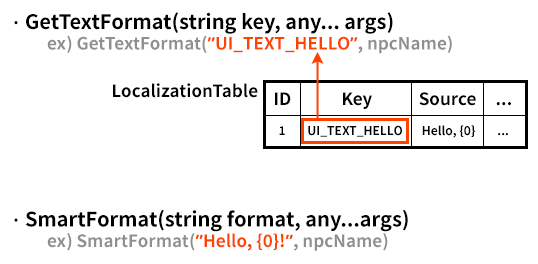
If you implement the above example using SmartFormat(), it will look like the following.
[client only][self]
HandleTriggerEnterEvent(TriggerEnterEvent event)
{
    -- Parameters
    local TriggerBodyEntity = event.TriggerBodyEntity
    --------------------------------------------------------
    local npcName = TriggerBodyEntity.NameTagComponent.Name
    local translateText = _LocalizationService:SmartFormat("안녕, {0}!", npcName)
    _EntityService:GetEntityByPath("/ui/DefaultGroup/TextBox").TextComponent.Text = translateText
}
However, with this setting, "안녕" will be output in Korean even when the client language setting is English (en). Modify the event handler as below to output according to each language setting.
[client only][self]
HandleTriggerEnterEvent(TriggerEnterEvent event)
{
    -- Parameters
    local TriggerBodyEntity = event.TriggerBodyEntity
    --------------------------------------------------------
    local npcName = TriggerBodyEntity.NameTagComponent.Name
    local localeId = _LocalizationService.CurrentLocaleId

    local translateTextKo = _LocalizationService:SmartFormat("Hello, {0}!", npcName)
    local translateTextEn = _LocalizationService:SmartFormat("Hello, {0}!", npcName)

    if localeId == "ko" then
	_EntityService:GetEntityByPath("/ui/DefaultGroup/TextBox").TextComponent.Text = translateTextKo
    elseif localeId == "en" then
    	_EntityService:GetEntityByPath("/ui/DefaultGroup/TextBox").TextComponent.Text = translateTextEn
    end
}
Utilizing Format
As seen above, LocalizationService provides two APIs to set the conversion formatting of text.
-
GetTextFormat(string key, any... args)
-
SmartFormat(string format, any... args)
The Argument hole included in the format can contain simple words, but can also contain characters converted according to certain rules. For example, Korean postposition or singular plural processing.
The format of Argument hole is:

Here, the contents in square brackets ([]) are optional elements. That is, you can simply put an index like {0}, but you can also set formatterName and formatterArgument. Using formatter, you can convert into natural sentences that fit the grammar of each linguistic cultural area.
You can use the two below as a formatter.
| formatterName | Function | Description |
|---|---|---|
| hpp | Korean postposition processing | It outputs one of the two formatterArguments depending on whether the last character of the string received as an argument contains a suffix or not. |
| plural or p | Singular, plural processing |
|
Let's take a closer look at how to use formatter.
hpp: Korean Postposition Processing
In Korean, postpositions are parts of speech that add grammatical meaning by being attached to the end of a noun (noun, pronoun, numeral). Depending on whether there is a consonant as the noun's coda, the postposition attached to the back will be different.
For example, in the sentence "나는 [ ]을/를 만납니다.", depending on the presence or absence of the last consonant of the word to enter the blank [ ], '을' or '를' will be attached.
| Words to enter the argument hole | Postposition | Completed sentence |
|---|---|---|
| 스탄 | 을 | 나는 스탄을 만납니다. |
| 리나 | 를 | 나는 리나를 만납니다. |
hpp is what allows you to process this. The basic format is shown below.

| Standard | Postposition |
|---|---|
| When there is a final word in the preceding noun | it will be 은, 이, 을, 과, 아, 이여, 이랑, 으로 |
| When there is no final word in the preceding noun | it will be 는, 가, 를, 와, 야, 여, 랑, 로 |
Let's see how to use hpp through an example.
-
Open LocalizationTable and modify row 3 as shown below.
ID Key Source ko en 3 UI_TEXT_HELLO I meet {0}. 나는 {0}{0:hpp:을|를} 만납니다. I meet {0}. -
Modify the event handler as below.
[client only][self] HandleTriggerEnterEvent(TriggerEnterEvent event) { -- Parameters local TriggerBodyEntity = event.TriggerBodyEntity -------------------------------------------------------- local npcName = TriggerBodyEntity.NameTagComponent.Name local translateText = _LocalizationService:GetTextFormat("UI_TEXT_HELLO",npcName) _EntityService:GetEntityByPath("/ui/DefaultGroup/TextBox").TextComponent.Text = translateText } -
Press the
[Start] button and run a test.
Retrieves appropriate text according to the language setting of the client.
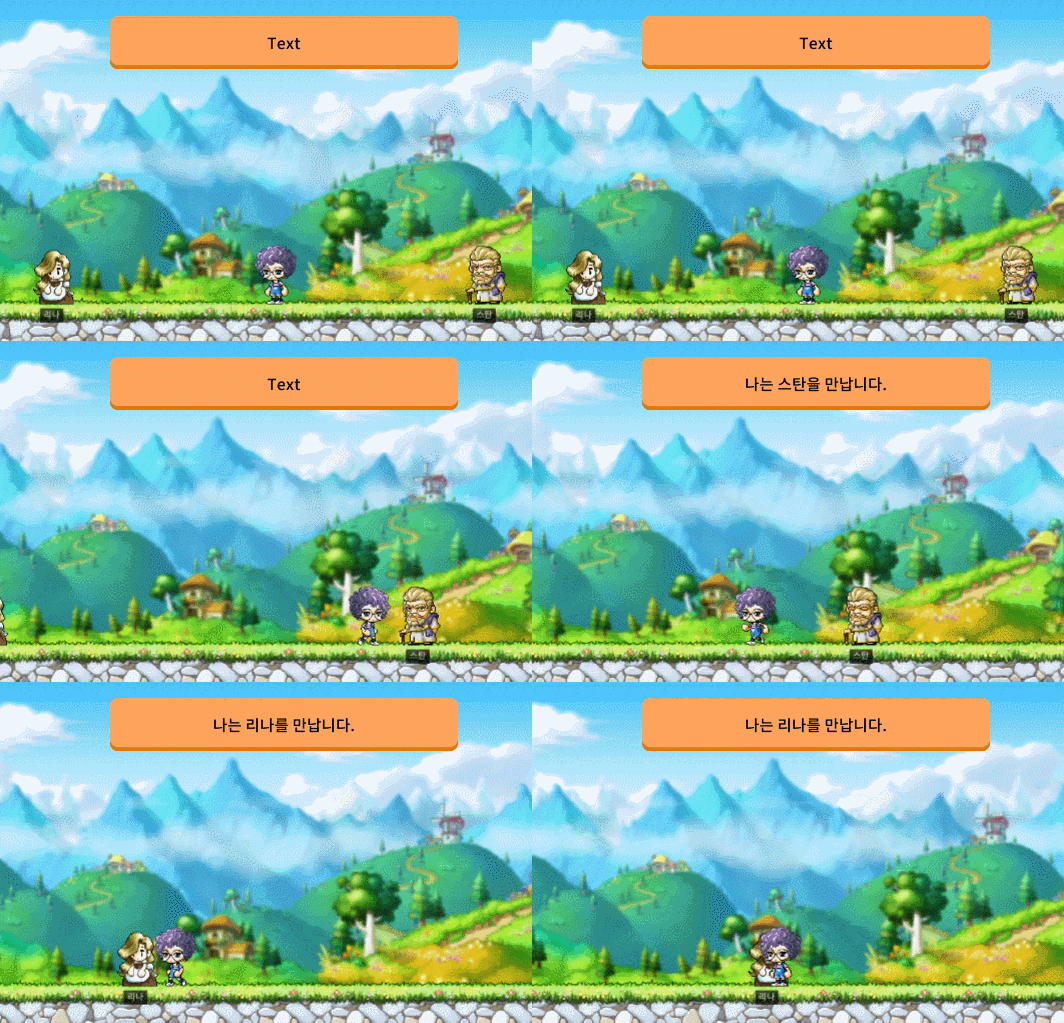
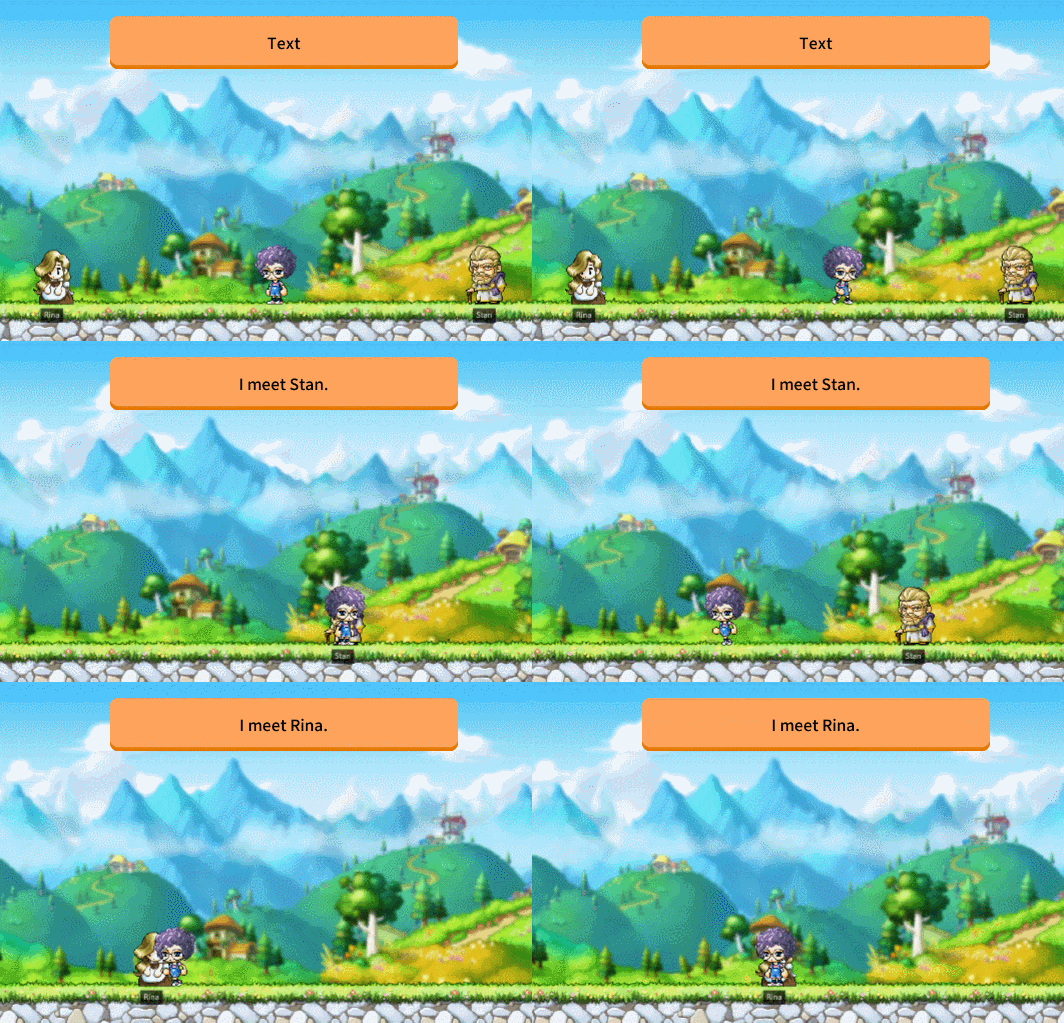
plural: Singular, Plural Processing
Korean does not require singular or plural processing, but there are languages that require singular or plural processing.
The basic format of plural to process this is as follows.

For example, in English, 1 is treated as singular, but the rest are treated as plural. So you receive two formatterArguments in total.

Let's use it as below.
_LocalizationService:SmartFormat("I have {0:plural:an apple|{} apples}.", 2) -- I have 2 apples.
As above, if you want to output the string received as an argument only in one formatterArgument, use empty braces {}.
Tip
plural can be shortened to p.
Exception
If the format is not correct as in the following, the original text is output.
If formatterName is wrong
If spaces are included in formatterName or there are typos, the original text will be output as it is.
-- 1) Language setting English: In case formatter name includes spaces
log(_LocalizationService:SmartFormat("I have {0: plural:an apple|{} apples}.", 2))

-- 2) If the formatter name itself is incorrect (e.g. hpp is incorrectly written as hp)
log(_LocalizationService:SmartFormat("나는 {0}{0:hp:을|를} 만났다.", "스탄"))

If you modify it as below, the properly converted string will be output according to the format.
log(_LocalizationService:SmartFormat("I have {0:plural:an apple|{} apples}.", 2))

log(_LocalizationService:SmartFormat("나는 {0}{0:hpp:을|를} 만났다.", "스탄"))

If the number of formatterArgument entered is different from the number requested
In this case, depending on the situation, it may be output normally, or it may be output as it is because it fails to convert to fit the format.
Please refer to the example below.
-- Language Setting Korean: Use plural
log(_LocalizationService:SmartFormat("아이템 {0:plural:한 |여러 }개를 획득했다.", 1))
-- Result: Original text output (because Korean plural receives only one formatter argument)

-- Language Setting English: When the number of formatter arguments is different from the required number
log(_LocalizationService:SmartFormat("I have {0:plural:one}.", 1))
-- Result: Original text output (because English plural receives only two formatter arguments)

-- Language Setting English: When the formatter argument is left blank
log(_LocalizationService:SmartFormat("I have {0:plural:|}.", 1))
-- Result: normal output (using an empty string as a formatter argument)
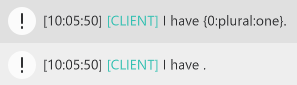
When not a pair of brackets {}
If the curly brackets are overlapped or the format is incorrect, the conversion will not work properly and the text will be output as it is.
If the number of formatArgument and the index of the argument hole do not match
In this case, depending on the situation, it may be output normally, or it may be output as it is because it fails to convert to fit the format.
Please refer to the example below.
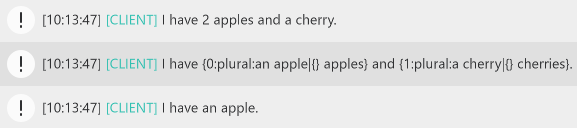
-- Language Setting English: The number of format arguments is greater than the maximum index of the argument hole +1
log(_LocalizationService:SmartFormat("I have {0:plural:an apple|{} apples} and {1:plural:a cherry|{} cherries}.", 2, 1, 1))
-- Result: normal output

-- Language Setting English: The number of format arguments is less than the maximum index of the argument hole
log(_LocalizationService:SmartFormat("I have {0:plural:an apple|{} apples} and {1:plural:a cherry|{} cherries}.", 2))
-- Result: Original Text Output

-- Language Setting English: Use by skipping the index of the format argument
log(_LocalizationService:SmartFormat("I have {1:plural:an apple|{} apples}.", 0, 1))
-- Result: Normal Output
Was the content on this page useful? Please share your thoughts.
Please let us know if there is an error on the page, or if you have any additional opinions. Error Report
More from this series
This Guides entry belongs to MapleStory Worlds. Related pages below keep this series separate from other MapleStory games.
Source and verification
MPStorys shows the readable on-site body above. The source page remains attached only as a citation and update trail.
MapleStory Worlds Creator Center Guides