MPStorysMAPLESTORY SERIES HUB
Back to Upcoming Updates
MapleStory WorldsGLB

Resource Hotfix Maintenance - 2026 June 28

Verified against MapleStory Worlds Creator Center News
Resource Hotfix Maintenance - 2026 June 28

Summary

“Resource Hotfix Maintenance - 2026 June 28” is an official maintenance notice from MapleStory Worlds Creator Center News on 2026-06-29. Its canonical Nexon thread and publication metadata are retained for source-backed verification.

Article body


Hello Creators,


On Sunday, June 28 PT, we will be performing a hotfix maintenance to fix resource errors.


If you have created content using the target resources, the specifications changed will be applied after the hotfix maintenance. 


Creators are advised to refer to the information provided to ensure a smooth content production.


Please note that this hotfix maintenance will not affect platform and app usage, such as accessing Worlds. In addition, resource verification may experience interruptions during the hotfix maintenance period. 


Please see the details below for more information.


1. Schedule

  • UTC: Monday, June 29 at 02:00
  • PDT (UTC -7): Sunday, June 28 at 19:00
  • KST (UTC +9): Monday, June 29 at 11:00 


2. Details

Windows/Mac/Mobile

  • Fixed an issue where frames were missing among avatar weapon item resources during certain actions. 

* If you created content with the target resources being fixed, the changed specifications will be applied after the hotfix maintenance period. 


3. List of Resources to Be Modified

  • Target Resources: 1 type of Avatar Item
  • You will be guided by the resource name that you can check in the MSW resource repository and Maker mode.

Resource

Resource Name

RUID

AvatarItem

onehandedweapon-2608

d3379c66189040f39c3f6d13075509e5


[Notice]

Enter the name of the resource in the list below [How to Check if Resources Are Used in the World]. You can check whether the modified resources were used in the World you have built.

[How to Check if Resources Are Used in the World]

  • Searching through AtlasBlueprint Editor 
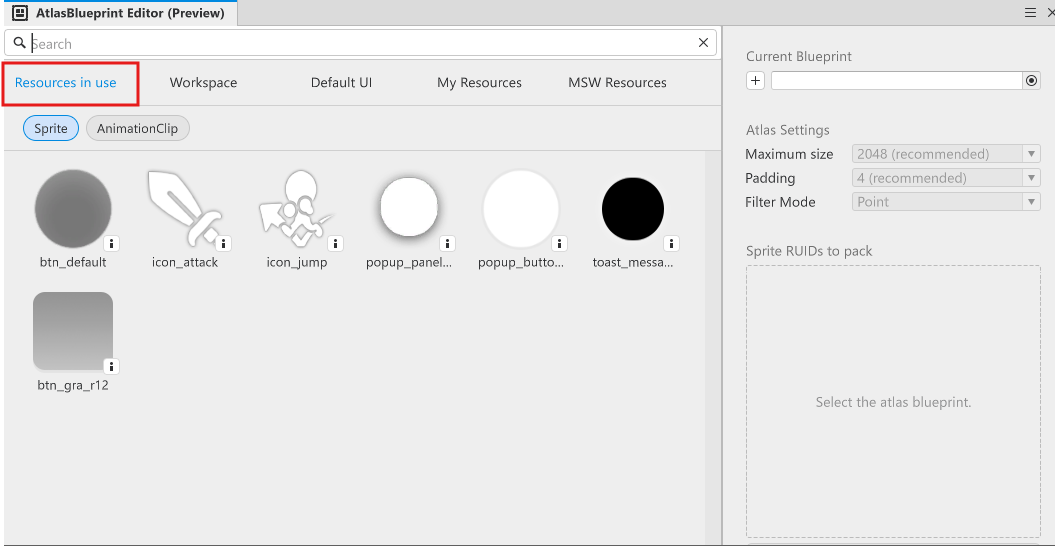
    • After entering the MapleStory Worlds Maker, open the [Panels → AtlasBlueprint Editor (Preview) panel.  
    • You can check the sprites used on the map you are currently searching for under [Resources in Use].
           
      * Only sprite search is supported.     
      * You can search based on the RUID information provided.
  • Querying via an external text editor  
    • After entering the MapleStory Worlds Maker, save your crafted World in .mod format using [File → Export to File].
    • After loading files using your external editor (e.g. VSCode), you can use the 'Find' function to check whether resources scheduled for end-of-support are available in the world.
      [Find → Paste RUID as guided] 

* Searching through external text editors is based on the RUID value. Please check the RUID information we provided in the Resources Tab.    

* Please understand that the method provided is not an official route to check resource usage, so it is not recommended. 


4. Impact

  • During the hotfix maintenance period, the resources being fixed may not be displayed properly. 


Thank you,
The MapleStory Worlds Team


More from this series

This Upcoming Updates entry belongs to MapleStory Worlds. Related pages below keep this series separate from other MapleStory games.

Source and verification

MPStorys shows the readable on-site body above. The source page remains attached only as a citation and update trail.

MapleStory Worlds Creator Center News